Key Takeaways
- The label is a review kill switch, and that is the real cost. Google: "Customers can leave new reviews for temporarily closed businesses but not for permanently closed ones." Existing reviews stay; every customer you serve under the label has nowhere to leave one.
- Google has two ways of stopping new reviews and only one of them tells anybody. A spam pause comes with an owner alert and a public "notification banner"; the closed label comes with neither.
- Reopening is four clicks (Edit profile, Hours, Edit, "Open with main hours") and Google covers the case: "if any of your businesses are mistakenly marked permanently closed, you can reopen the location."
- There is one case where reopening is the wrong move. "If your business was marked permanently closed as part of a location or name change, do not reopen the business." The reviews then move only if you ask: "contact us for help."
- Whether you can reopen at all is a field you do not control. Google's Business Information API exposes canReopen as "Output only. Indicates whether this business is eligible for re-open."
- What the "permanently closed" label actually does
- The part that costs money: new reviews stop
- Two ways Google stops your reviews, and only one tells you
- Who can mark your business closed
- Reopen it, and the one case where you must not
- When you cannot get into the profile
- When the closure is fraud, not an error
- Closed is not suspended, and not removed
- Moving or renaming: the closure that should happen
- What actually warns you next time
- The one-hour version
- Frequently asked questions
You are open, the lights are on, and Google has your name struck through with "Permanently closed" underneath it. Finding your business marked permanently closed on Google is not a cosmetic problem: Google blocks new reviews on a permanently closed profile, so the label switches off review acquisition for as long as it stands. Four clicks usually undo it, and there is exactly one situation in which those four clicks are the worst thing you can do. We read Google's closed, reopened, removal and relocation help pages line by line, pulled the Business Information API's own status enum, and measured the seven guides ranking for this problem: four carry no table and two cite no Google source at all.
What the "permanently closed" label actually does
"Permanently closed" is a status on your profile's hours, not a penalty or a strike. Google's help page says that "if you mark a business as permanently closed, your Business Profile may still appear on Search and Maps for users who search for it" and "it clearly shows that your business is closed." You keep the profile and the reviews. What you lose is the ability to collect new ones, and some visibility.
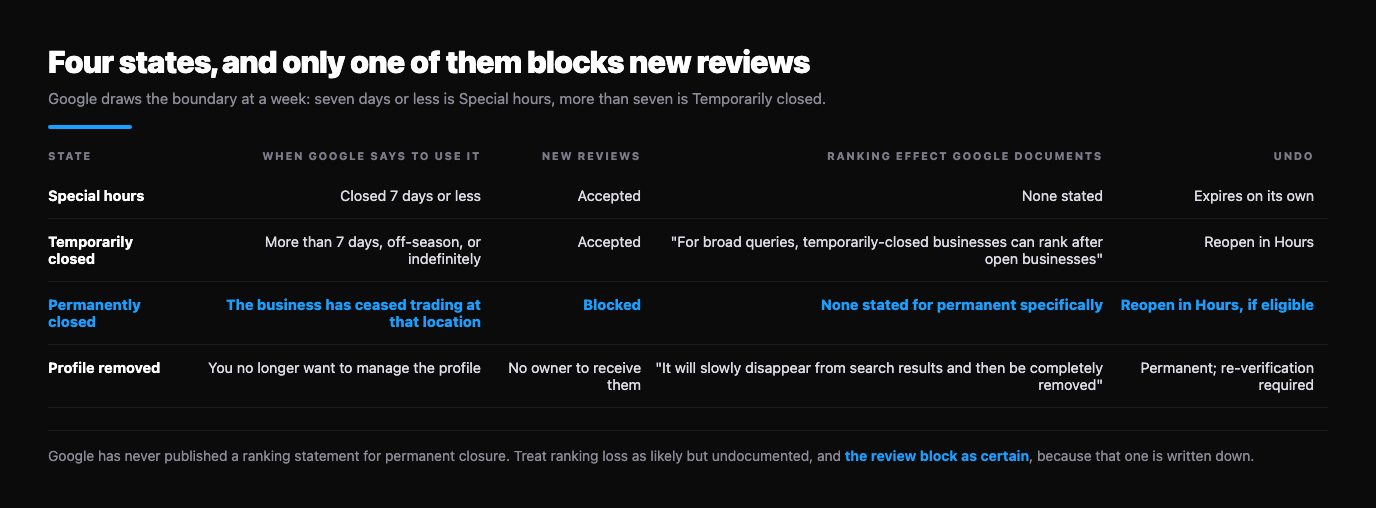
The four states are easy to confuse, which is most of why the wrong one gets chosen. Google draws the boundary at a week: "if your business is closed for more than 7 days, closed for the off-season, or closed indefinitely, use the option 'Temporarily closed.' If your business is closed for 7 days or less, use set Special hours."
| State | When Google says to use it | New reviews | Ranking effect Google documents | Undo |
|---|---|---|---|---|
| Special hours | Closed 7 days or less | Accepted | None stated | Expires on its own |
| Temporarily closed | More than 7 days, off-season, or indefinitely | Accepted | "For broad queries, temporarily-closed businesses can rank after open businesses" | Reopen in Hours |
| Permanently closed | The business has ceased trading at that location | Blocked | None stated for permanent specifically | Reopen in Hours, if eligible |
| Profile removed | You no longer want to manage the profile | No owner to receive them | "It will slowly disappear from search results and then be completely removed" | Permanent; re-verification required |
The ranking sentence is Google's, and it is written only about temporarily closed listings: "this ranking effect depends on factors such as business category, query type, and how many matching businesses are temporarily closed." Google has never published the equivalent for permanent closure, so treat ranking loss as likely but undocumented, and the review block as certain, because that one is written down.
The part that costs money: new reviews stop
One sentence decides how urgently to treat this. On Google's page about reviews on closed and moved businesses: "If your business closes for a while or permanently, the reviews remain on the profile," and then, "Customers can leave new reviews for temporarily closed businesses but not for permanently closed ones."
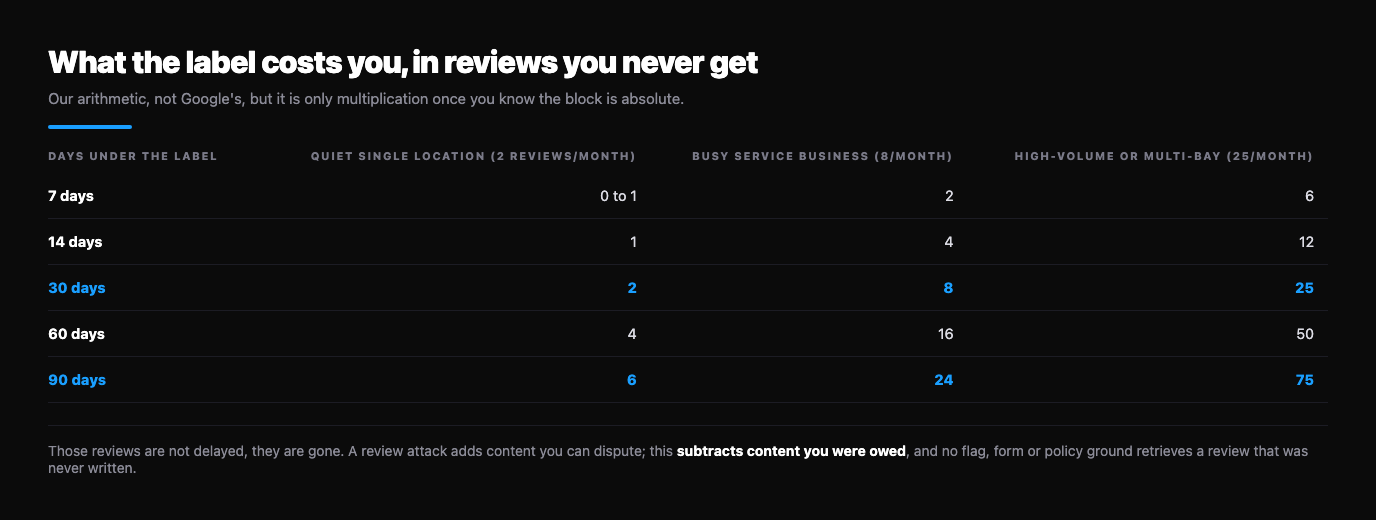
So the damage is not to the reviews you have. It is to the reviews you were going to get. If your team asks for a review after every job, that request now lands on a profile that will not take one, and nobody tells you. The arithmetic below is ours, not Google's, but it is only multiplication once you know the block is absolute.
| Days under the label | Quiet single location (2 reviews/month) | Busy service business (8/month) | High-volume or multi-bay (25/month) |
|---|---|---|---|
| 7 days | 0 to 1 | 2 | 6 |
| 14 days | 1 | 4 | 12 |
| 30 days | 2 | 8 | 25 |
| 60 days | 4 | 16 | 50 |
| 90 days | 6 | 24 | 75 |
Those reviews are not delayed, they are gone: the customer who would have written one in week two does not come back in week nine to do it. That makes a mistaken closure a different animal from the attacks we usually write about. A review attack adds content you can dispute; this subtracts content you were owed, and no flag, form or policy ground retrieves a review that was never written. Which is why the clicks below matter more than any appeal.
Two ways Google stops your reviews, and only one tells you
Google runs two mechanisms that stop new reviews reaching a profile, and comparing them shows what is wrong with the closed label. In its 16 April 2026 announcement, Google describes what it does on detecting a review attack: "pause new reviews on the profile, alert the Business Profile owner and display a notification banner", "to let consumers know why contributions are temporarily paused."
Spam pause: Google's choice, temporary by design, the owner is alerted, and the public sees a banner explaining the gap in the review history.
Permanently closed: anyone's choice, indefinite, no alert is promised, and the public sees a business that appears to have shut rather than one whose reviews are paused.
That asymmetry is the whole problem. When Google pauses your reviews to protect you, it accounts for the silence. When they stop because a status field flipped, nothing does, and six months later the record reads as a business that traded hard until April and then stopped. Google promises notification in the adjacent case only, in narrow wording: "if Google receives an update that a location is temporarily closed, you may get an email notification." That is may, and it names temporary closure alone.
Who can mark your business closed
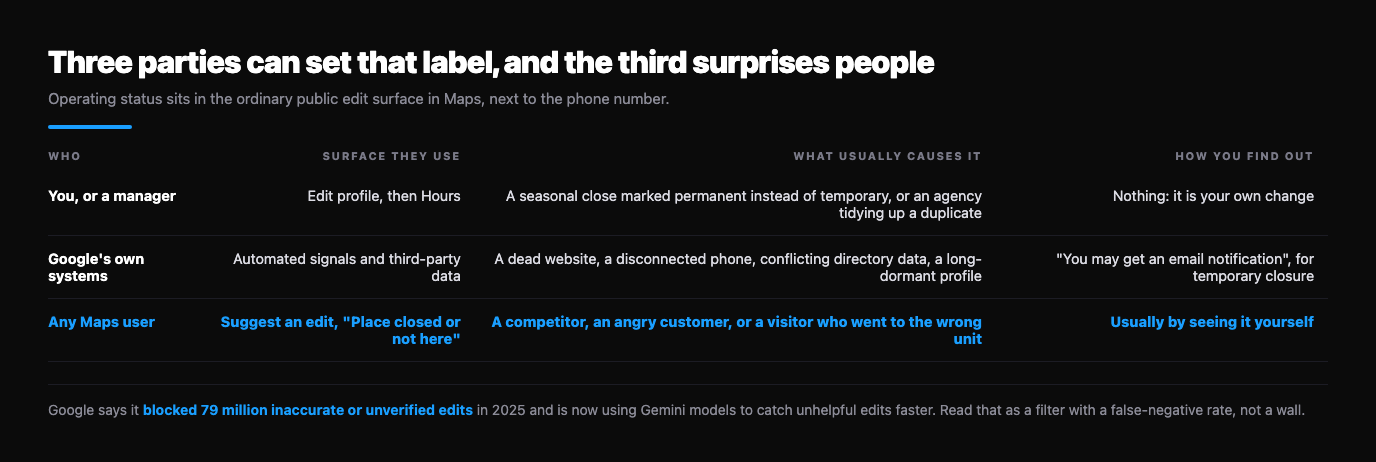
Three parties can set that label, and the third surprises people. Google's page on editing place information in Maps lists what any signed-in user can "add, edit, or report" on a listing they do not own: hours, phone number, website, category, location, and "Place closed or not here." Operating status sits in the ordinary public edit surface, next to the phone number.
| Who | Surface they use | What usually causes it | How you find out |
|---|---|---|---|
| You, or a manager | Edit profile, then Hours | A seasonal close marked permanent instead of temporary, or an agency tidying up a duplicate | Nothing: it is your own change |
| Google's own systems | Automated signals and third-party data | A dead website, a disconnected phone, conflicting directory data, a long-dormant profile | "You may get an email notification", for temporary closure |
| Any Maps user | Suggest an edit, "Place closed or not here" | A competitor, an angry customer, or a visitor who went to the wrong unit | Usually by seeing it yourself |
Public edits are not waved through, and the screening is published: Google "blocked 79 million inaccurate or unverified edits to help keep Business Profiles factual" in 2025, and is "now using our Gemini models to automatically catch unhelpful edits faster than ever." Read that as a filter with a false-negative rate rather than a wall. Edits do land, which is why owners keep finding this label without having touched it. The same help page carries a quiet diagnostic: "if you only find the option to change a place's operating status, the place might be temporarily or permanently closed." A listing whose edit menu has collapsed to status alone is already carrying a closure, whatever your dashboard shows.
Reopen it, and the one case where you must not
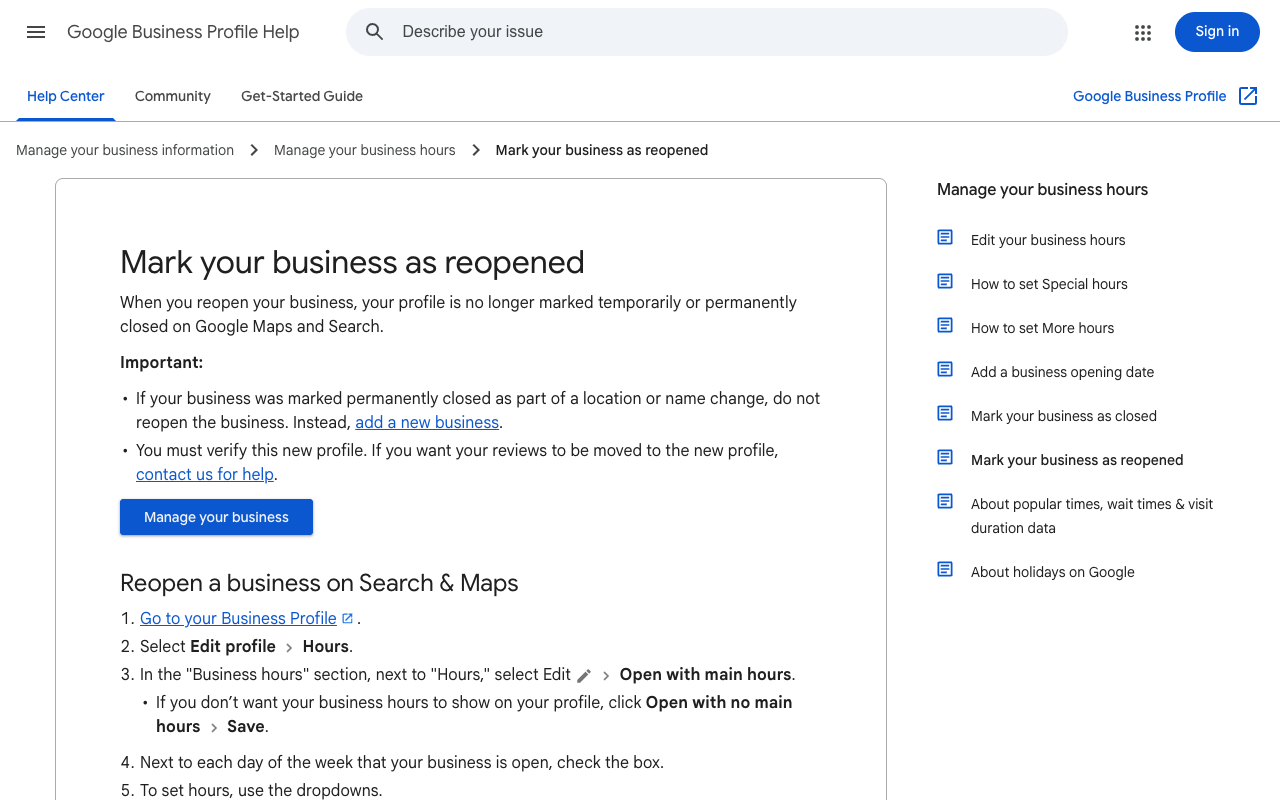
Google writes the mistaken case into its own documentation, which is the first good news on this page: "if you reopen a closed business or if any of your businesses are mistakenly marked permanently closed, you can reopen the location." The reopening page gives the path: Business Profile, Edit profile, Hours, Edit next to Hours, "Open with main hours", Save. "Open with no main hours" does the same job without displaying hours. For a group of locations, Business Profile Manager takes Actions, then Open, then "Mark as open."
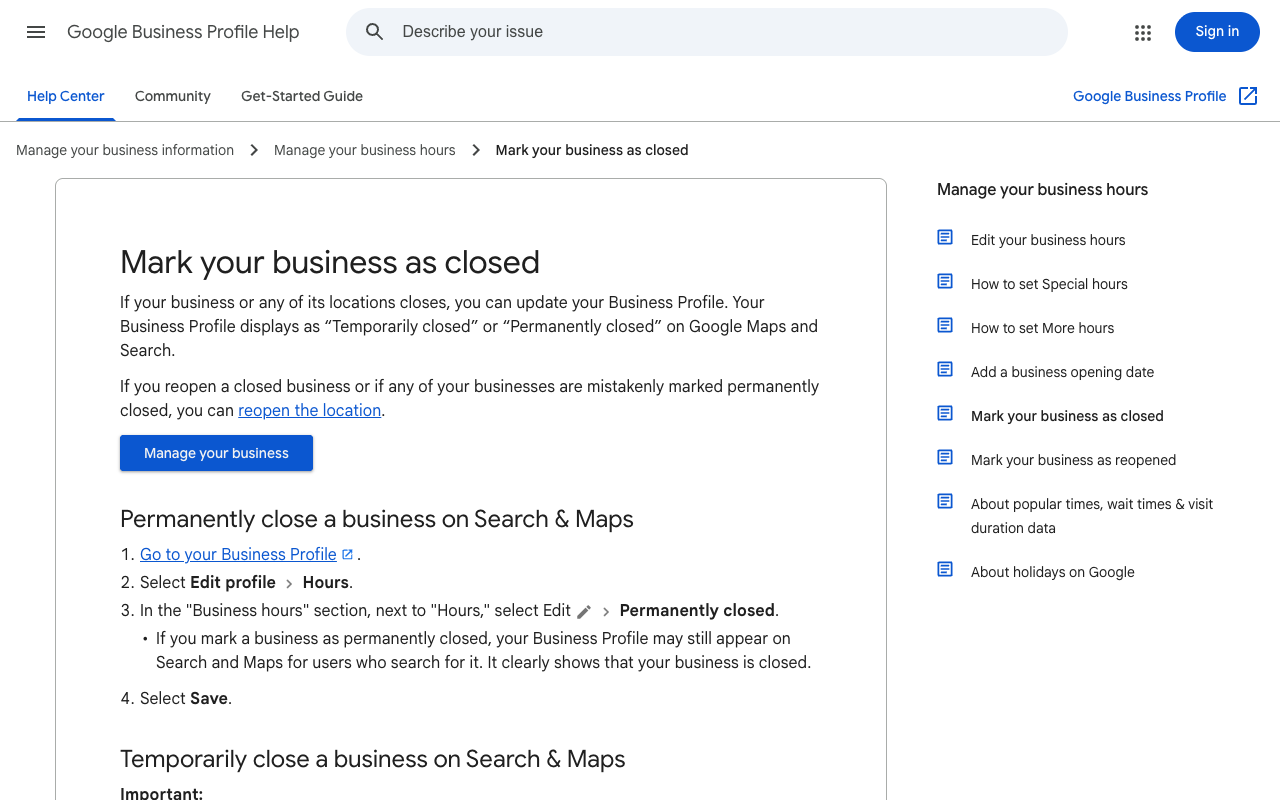
Now the exception, which is the sentence no other guide for this problem carries: "If your business was marked permanently closed as part of a location or name change, do not reopen the business. Instead, add a new business. You must verify this new profile. If you want your reviews to be moved to the new profile, contact us for help."
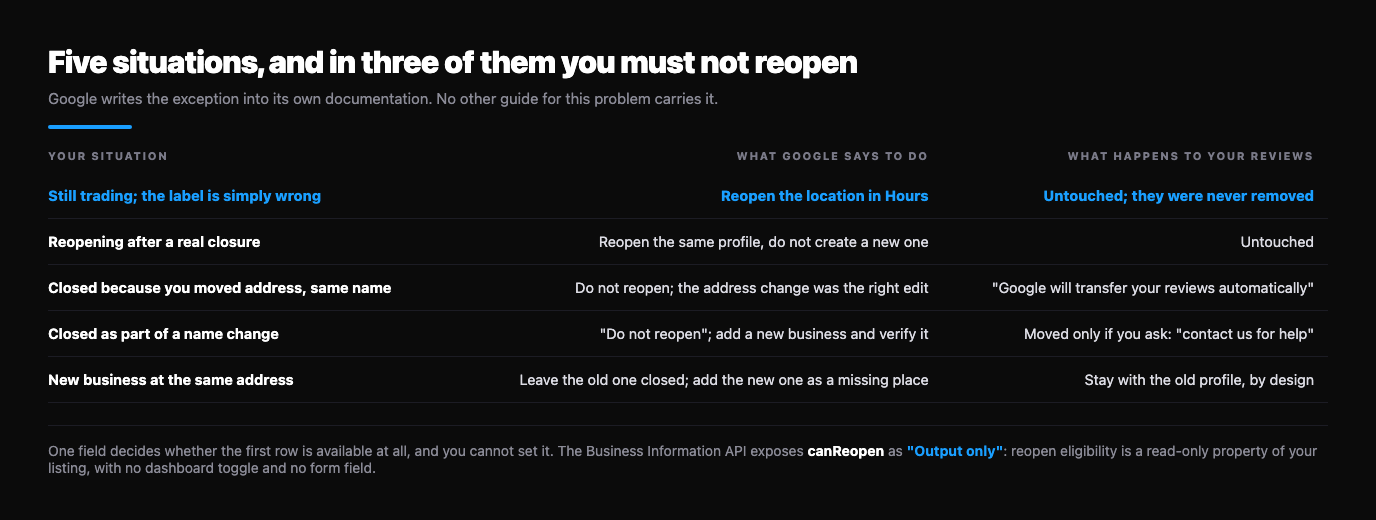
| Your situation | What Google says to do | What happens to your reviews |
|---|---|---|
| Still trading; the label is simply wrong | Reopen the location in Hours | Untouched; they were never removed |
| Reopening after a real closure | Reopen the same profile, do not create a new one | Untouched |
| Closed because you moved address, same name | Do not reopen; the address change was the right edit | "Google will transfer your reviews automatically" |
| Closed as part of a name change | "Do not reopen"; add a new business and verify it | Moved only if you ask: "contact us for help" |
| New business at the same address | Leave the old one closed; add the new one as a missing place | Stay with the old profile, by design |
One field decides whether the first row is available to you at all, and you cannot set it. Google's Business Information API models status as an enum with three live values, OPEN, CLOSED_TEMPORARILY and CLOSED_PERMANENTLY, and notes that "all locations are open by default, unless updated to be closed." Alongside it sits canReopen: "Output only. Indicates whether this business is eligible for re-open." Reopen eligibility is a read-only property of your listing, computed by Google, with no dashboard toggle and no form field. If the reopen path refuses you, that is the flag you are arguing with, and that argument goes to support rather than the interface.
When you cannot get into the profile
Every step above assumes owner or manager access, and plenty of businesses find the closed label and then find the profile was claimed years ago by a former agency or a departed employee. Work the ladder in order, because each rung takes longer than the one above it.
- Try the account you have forgotten about: the profile is usually on a personal Gmail rather than the business domain.
- Request ownership through Google's claim flow. The current owner gets a window to respond, so start it today, not after the other rungs.
- Suggest an edit as a member of the public, correcting the operating status. It is the same surface a stranger used to close you.
- Take it to support with trading evidence: recent invoices, dated photographs of open signage, a utility bill at the address. Our walkthrough of contacting Google support about a profile dispute covers the chat and email routes.
When the closure is fraud, not an error
A closure can be the opening move of something deliberate: a competitor closing a rival during a busy fortnight, sometimes followed by a call from somebody claiming to be Google support who will fix the listing for a fee. Google does not phone to sell a status correction. Treat that call as the second half of the attack and keep the number. Reversing your own status is still the first move, because it is the part you control. After that there are two reporting routes, and they are not interchangeable.
The in-Maps route is for listings you believe are not real. Google's wording: "if you find a business with offensive, harmful, or misleading info that makes you believe it may not exist, submit a report." Suggest an edit, then "Place is closed or not here", then "Offensive, harmful, or misleading."
The Business Redressal Complaint Form is where Google's own page sends suspected fraud on a business name, phone number or URL, and its dropdown also carries "This business doesn't exist." We take that form apart field by field in reporting a fake Google business listing.
If the closure arrived alongside a wave of one-star reviews, treat them as one campaign rather than two problems: detecting and stopping competitor sabotage sets out how to document the timing, which is the evidence that makes both complaints credible.
Closed is not suspended, and not removed
Owners arrive at this calling it a suspension, and the fix is different. Three states look alike from outside and behave nothing alike.
| State | What it is | Who can undo it | What you lose |
|---|---|---|---|
| Permanently closed | A status on your hours | You, in four clicks, if canReopen allows | New reviews, and some visibility |
| Suspended | An enforcement action against the profile | Google, via reinstatement | The listing's visibility and your management of it |
| Content and managers removed | You gave up the profile | Nobody: "permanent" | Posts, photos, videos and every review reply |
The third row holds the trap, and one ranking guide gets it backwards by telling readers a deleted profile's reviews "may be lost". Google says the opposite: "removal of content and managers for a Business Profile is permanent ... Any posts, photos, videos, and review replies by owners and managers are permanently removed. User-generated content and review remains." The reviews survive you; your replies do not, the same expendable-asset pattern we found in Google's merge documentation in another business's reviews on your Google profile.
Three more clauses from that page belong in front of anybody about to click Remove: "when you remove all ownership and content from your Business Profile, it doesn't guarantee that the business won't show up on Maps and Search", so removal can leave an unmanaged listing standing; "to manage your business again, you must re-verify your Business Profile"; and "new owners and managers must wait 7 days before they can remove profile content or managers." Where a closure set in that flow ends up is documented too: "it won't disappear from Maps right away. It will slowly disappear from search results and then be completely removed." If your profile is genuinely suspended rather than closed, start with a profile suspended after a review dispute.
Moving or renaming: the closure that should happen
Not every closed label is a mistake, and some owners create one by solving the wrong problem. Google's instruction for a relocation is to edit the profile you already have: "do not create a new Business Profile because of a change in a physical location or ownership." The reward is automatic: "if you move to a new address and keep the same business name, Google will transfer your reviews automatically." The transfer may not be automatic in some categories, and Google names hotels, golf courses and scenic attractions.
A rename is harder, because Google treats a large enough one as a different company: "if your business changes its name but doesn't meet the criteria above, it's considered a new business," and "if significant business changes occur, we might remove irrelevant reviews." Maps says the same from the public side: where there is a new business at a location, or the existing one "has changed its name significantly", mark it permanently closed and add the new business as a missing place.
That is a deliberate hand-off rather than a bug: the old identity keeps its reviews, the new one starts clean, and the bridge is a manual request to support. Buying a business runs on the same rails, covered in buying a business with bad Google reviews, where that clause is the only documented route to a clean slate and costs the good reviews along with the bad.
What actually warns you next time
Google is building the alert this problem needs, and its qualifying words are the whole story. From the April 2026 announcement: Google is "rolling out proactive email alerts so verified and active owners" can "review important edits to their Business Profiles before they go live."
Verified and active are doing real work there. A profile nobody has signed into since verification is exactly the one a stale-data closure lands on, and also the one least likely to get the warning, which makes logging in a security measure rather than housekeeping. Until the alerts are everywhere, the cheap version is a weekly look at your listing in an incognito window plus a brand alert, set up in the Google Alerts guide. A closure caught in two days costs almost nothing. One caught in two months is in the table above.
The one-hour version
- Screenshot it, date visible, before you change anything.
- Ask whether anybody on your side meant it: a move, a rename, a sale, an agency clearing duplicates. If yes, re-read the reopen table.
- Check who has access, and whether a manager made the edit.
- Reopen it: Edit profile, Hours, Edit, "Open with main hours", Save. Several locations go through Business Profile Manager, Actions, Open.
- If the option is missing or refuses, you are arguing with canReopen, not the menu. Take trading evidence to support.
- Fix the inputs that make a closure look true: live website with current hours, a phone that answers, consistent name and address across directories.
- Resume review requests only once the label is gone, and tell the team, so nobody reads the quiet fortnight as a service problem.
- If it was somebody else's doing, file the right report and keep the number of anyone offering to fix it for a fee.
- Diary a weekly check for a month. Whatever set the label once can set it again.
A closure and a review attack often arrive together
Flaggd reads Google's policies against the actual content and files evidenced, single-ground disputes. If the reviews that landed around your closed label breach policy, naming the right ground on the right route is most of the work.
Flaggd is our own service. We dispute content that breaches Google policy; we do not remove or suppress content that does not, nobody can guarantee a removal, we cannot change a listing's operating status for you, and nothing here is legal advice.
- →Google Business Profile suspended after a review dispute
- →Report a fake Google business listing
- →Another business's reviews on your Google profile
- →Bought a business with bad Google reviews
- →Competitor sabotage: detecting and stopping fake review attacks
- →Remove your business from Google Street View
Frequently asked questions
Treat this as a clock, not a cosmetic defect. Screenshot it, work out whether anybody on your side meant it, reopen it if they did not, and fix the signals that make the closure look true. The reviews you have are safe; the ones you lose are the ones nobody can write while the label stands, and no dispute route recovers those.
- Mark your business as closed — Google Business Profile Help
- Mark your business as reopened — Google Business Profile Help
- Remove a Business Profile from your Google Account — Google Business Profile Help
- Reviews on closed, moved and renamed businesses — Google Help
- Edit place information in Google Maps — Google Maps Help
- Report a business on Google Maps — Google Maps Help
- New ways we're protecting businesses on Maps — Google, 16 April 2026
- Business Information API: Location and OpenInfo — Google for Developers