Key Takeaways
- Only one of Google's routes takes a fraud complaint. The Business Redressal Complaint Form covers fraud "related to the name, phone number, or URL of a business" and nothing else: outside that, "we will not be able to review".
- An incomplete complaint is discarded, not queued: "we will not process your complaint if it isn't properly filled out or if the complaint is incomplete." The URL field refuses anything not starting with https://www.google.com/maps.
- The in-Maps route needs a listing you believe does not exist — "misleading info that makes you believe it may not exist" — so a stuffed name on a real business belongs on the form.
- The form is built for waves. Google: report "multiple businesses at once by uploading 10 or more profiles or a spreadsheet with all URLs", and it recommends "submitting 10-100 at a time".
- You get a case ID and no outcome: "you will not be updated on its status." Of 3 million fake profiles removed in 2018, "more than 250,000" came from user reports; internal systems drove "more than 85 percent".
- The three routes, and which one takes your case
- What the Business Redressal Complaint Form is actually for
- Fill the form so it is not discarded
- Reporting a keyword-stuffed competitor name
- When the in-Maps route is the right one
- Build the evidence packet before you file
- What happens after you submit
- Why one report is still worth filing
- When not to report, and what Google actually allows
- The one-hour version
- Frequently asked questions
There is a locksmith at your address who has never held a key, or a profile with your trade and your city stapled into its name sitting two places above you on Maps. Deciding to report a fake Google business listing is the easy part; picking the channel that will read it is where owners lose a month, because Google runs several and each silently refuses what the others are for. Google says it removed over 13 million fake Business Profiles in 2025 and restricted more than 782,000 accounts, so the machinery exists. We filled the redressal form out field by field, read Google's three reporting pages and its business-name examples table line by line, and checked every URL printed by the six guides ranking for this query — one of them is a 404.
The three routes, and which one takes your case
Google's own help page, Report a business on Google Maps, opens with the sentence that explains every stalled complaint: "Make sure to use the correct form for your report."
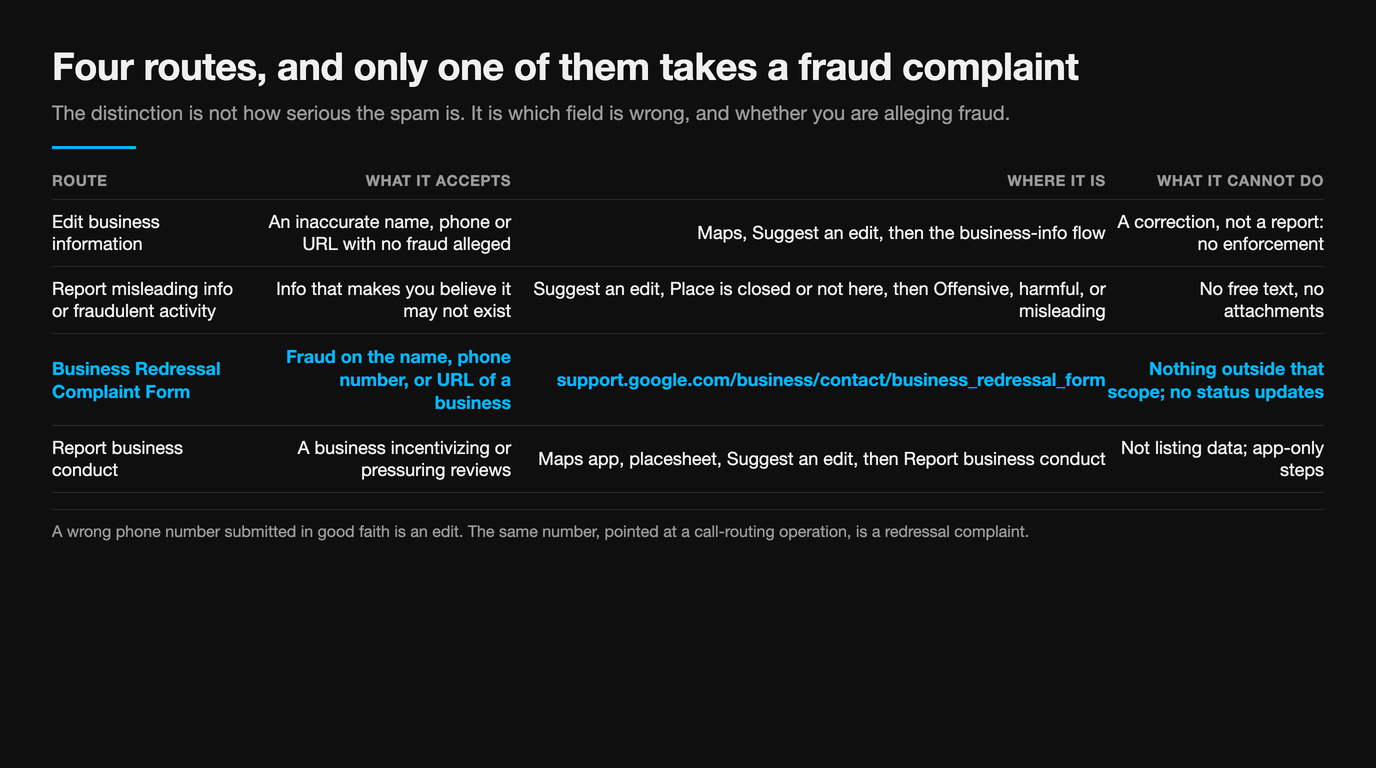
The distinction that matters is not how serious the spam is. It is which field is wrong and whether you are alleging fraud. A wrong phone number submitted in good faith is an edit. The same number, pointed at a call-routing operation, is a redressal complaint. A business that is not there at all is an in-Maps report.
| Route | What it accepts | Where it is | What it cannot do |
|---|---|---|---|
| Edit business information | An inaccurate name, phone or URL with no fraud alleged | Maps, Suggest an edit, then the business-info flow | A correction, not a report: no enforcement |
| Report misleading info or fraudulent activity | Info "that makes you believe it may not exist" | Suggest an edit, "Place is closed or not here", then "Offensive, harmful, or misleading" | No free text, no attachments |
| Business Redressal Complaint Form | Fraud on "the name, phone number, or URL of a business" | support.google.com/business/contact/business_redressal_form | Nothing outside that scope; no status updates |
| Report business conduct | A business incentivizing or pressuring reviews | Maps app, placesheet, Suggest an edit, then "Report business conduct" at the bottom | Not listing data; app-only steps |
The first of those four is not a report at all. If your complaint is "this information is wrong", Google wants an edit. If it is "this information exists to deceive", you are in the enforcement system, and the form is the only route with a box big enough to say why. We walk through what a flag does and does not reach in how to flag a Google review, and what happens next.
What the Business Redressal Complaint Form is actually for
The form states its own scope in one sentence, narrower than almost every guide to it: "If you come across misleading information or fraudulent activity on Google Maps related to the name, phone number, or URL of a business, you may use this form to submit a complaint."
"If your complaint is not related to fraudulent activity on the name, phone number, or URL of the business, we will not be able to review your complaint." And separately: "If you simply need to correct an incorrect business name, phone number, or URL, do not use this form."
Read those together and the gate is clear. Name, phone number or URL, plus an allegation of fraud. Drop the fraud and it is an edit. Move to a different field and it is out of scope. Several pages ranking for this topic widen the form to "business information" generally and "multiple connected profiles", which is how a complaint about photos, categories or hours ends up in a channel that has already said it will not read it.
Then the form's own dropdown does something odd. Asked to "Identify the content on Google Maps that you claim might lead to fraudulent activity", it offers five options: Title, Address, Phone number, Website, and "This business doesn't exist". Two of those are not in the stated scope. Google has quietly built in the fake-address and phantom-business cases while its instructions still say name, phone and URL.
The practical reading, and the one we file on: pick the option that matches the content, then make sure the written explanation also lands on a name, phone or URL fact wherever the case honestly allows. A fake address usually travels with a stolen name or a routing number, and saying so keeps the complaint inside the sentence that governs the review. Note too that in 2019 Google called this route the way "people can report multiple business profiles at once" — it was built for clusters.
Fill the form so it is not discarded
The form closes with the single most useful line on the page: "Please note that we will not process your complaint if it isn't properly filled out or if the complaint is incomplete." Because you are never told the outcome, a discarded submission looks identical to a reviewed one that went nowhere. Most "Google ignored my report" stories are indistinguishable from this. Here is the whole form, field by field, with the mistake that voids each one.
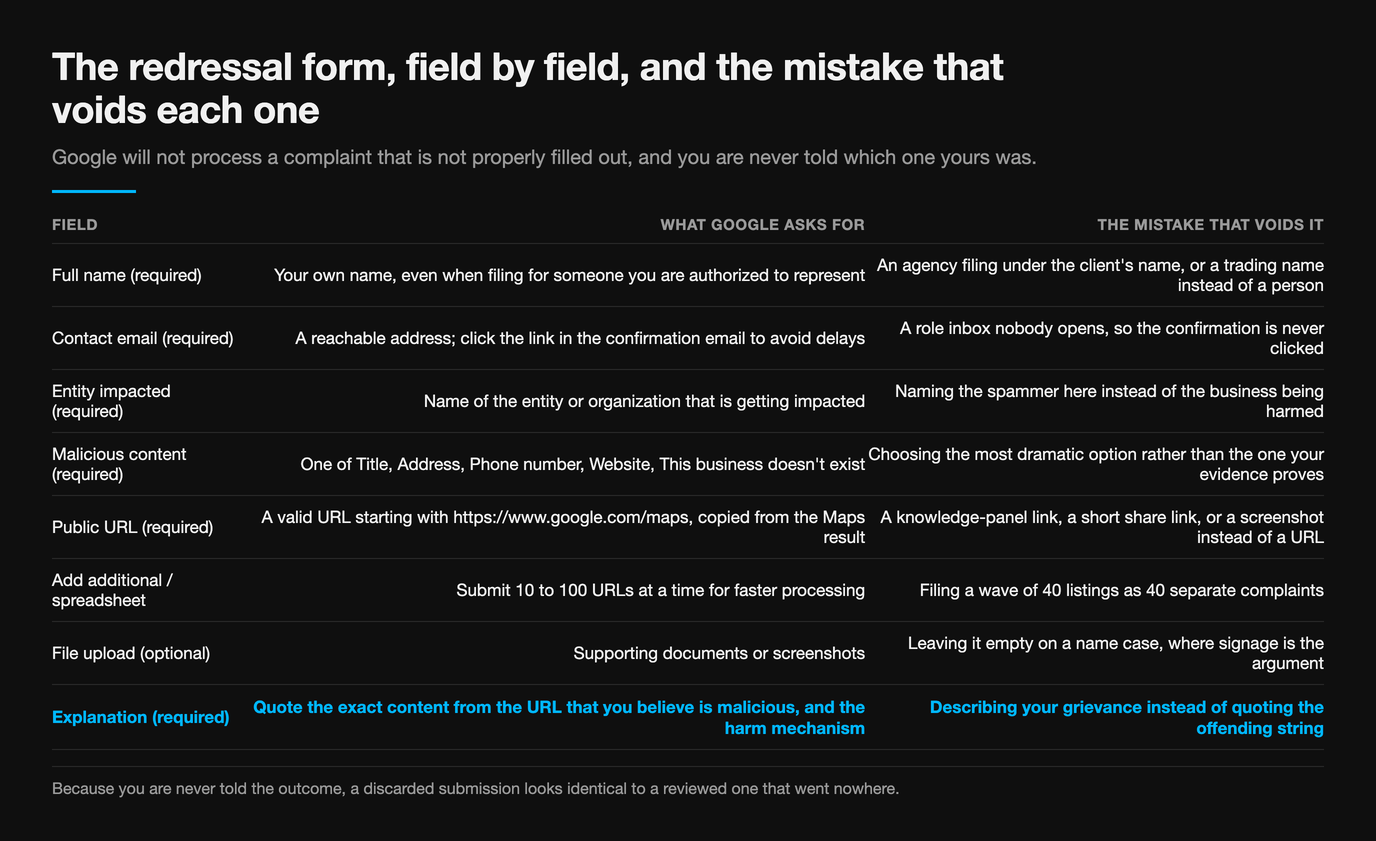
| Field | What Google asks for | The mistake that voids it |
|---|---|---|
| Full name (required) | "Your own name, even if you are making the request on behalf of someone else who you are authorized to represent" | An agency filing under the client's name, or a trading name instead of a person |
| Contact email (required) | A reachable address. Google then asks you to "Click the link in the confirmation email to avoid delays" | A role inbox nobody opens, so the confirmation is never clicked |
| Entity impacted (required) | "Name of the entity or organization that is getting impacted" | Naming the spammer here instead of the business being harmed |
| Malicious content (required) | One of Title, Address, Phone number, Website, "This business doesn't exist" | Choosing the most dramatic option rather than the one your evidence proves |
| Public URL (required) | "Please enter a valid URL starting with https://www.google.com/maps", copied from the Maps result | A knowledge-panel link, a short share link, or a screenshot instead of a URL |
| Add additional / spreadsheet | "If you have many URLs to report, we recommend submitting 10-100 at a time for a faster processing time" | Filing a wave of 40 listings as 40 separate complaints |
| File upload (optional) | Supporting documents or screenshots | Leaving it empty on a name case, where signage is the argument |
| Explanation (required) | "quote the exact content from the URL above that you believe is malicious"; for a phone or website, "how it might impact other users/business" | Describing your grievance instead of quoting the offending string |
The explanation box is where complaints are won. Google does not ask what you think is happening; it asks you to quote the exact content and, for a phone or website, to explain the harm mechanism. "They are stealing my customers" is a grievance. "The title reads Emergency Locksmith Downtown Dallas 24/7, which contains service, location and hours information; the listed number forwards to a national dispatch centre, not the address shown" is a complaint that maps onto a published rule. We set out the same discipline for reviews in how to document evidence for a review dispute.
Reporting a keyword-stuffed competitor name
This is the commonest real case, and the one guides handle worst. Google's Guidelines for representing your business on Google require a name reflecting "your business's real-world name, as used consistently on your storefront, website, stationery, and as known to customers", then state the consequence: "Including unnecessary information in your business name isn't permitted, and could result in the suspension of your Business Profile."
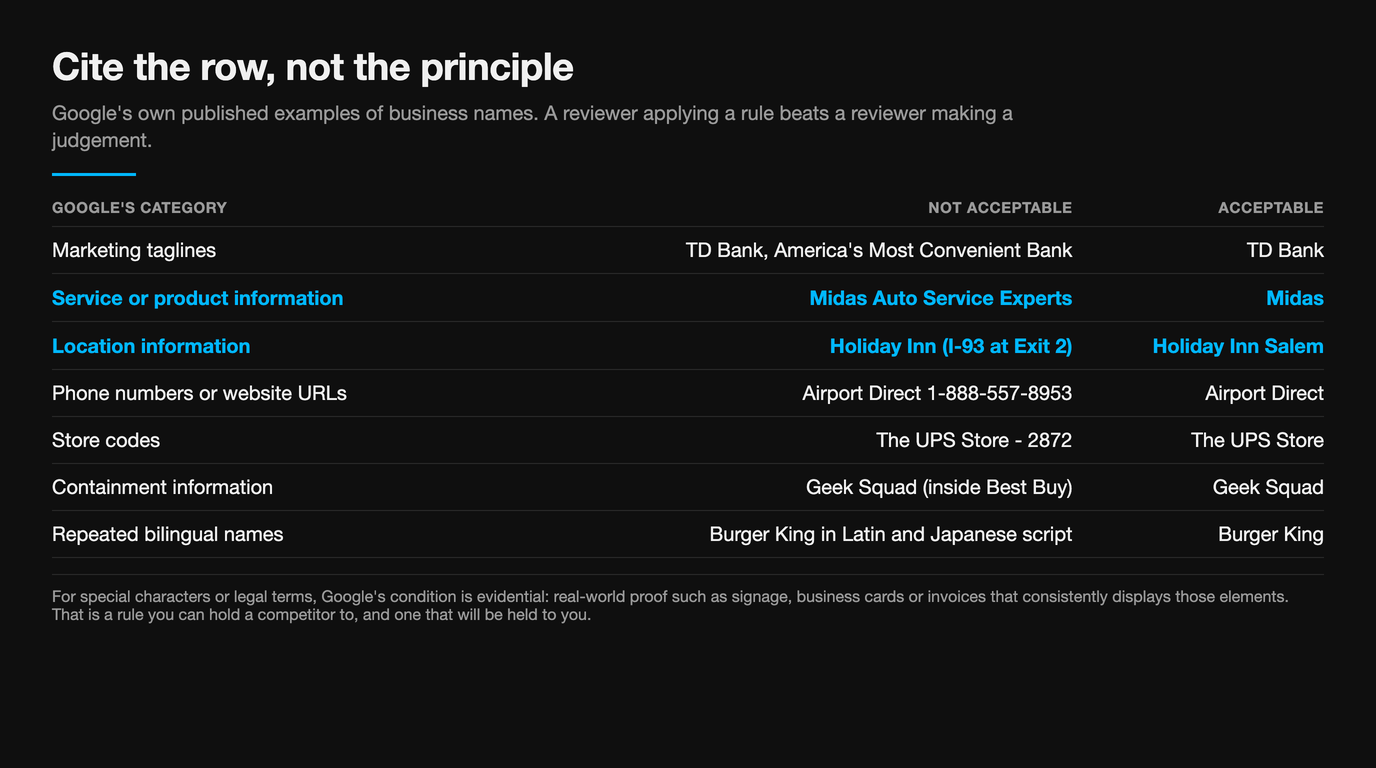
Google then publishes a table of examples. Cite the row, not the principle: a reviewer reading "the name is stuffed with keywords" must make a judgement, while one reading "the name contains service and location information, per the published examples" is being asked to apply a rule.
| Google's category | Not acceptable | Acceptable |
|---|---|---|
| Marketing taglines | TD Bank, America's Most Convenient Bank | TD Bank |
| Service or product information | Midas Auto Service Experts | Midas |
| Location information | Holiday Inn (I-93 at Exit 2) | Holiday Inn Salem |
| Phone numbers or website URLs | Airport Direct 1-888-557-8953 | Airport Direct |
| Store codes | The UPS Store - 2872 | The UPS Store |
| Containment information | Geek Squad (inside Best Buy) | Geek Squad |
| Repeated bilingual names | Burger King バーガーキング | Burger King |
One row deserves a note before you file. For special characters or legal terms, Google's condition is evidential: "you must provide real-world proof (e.g. signage, business cards, invoices) that consistently displays those elements as part of your business name." That is a rule you can hold a competitor to, and one that will be held to you.
Set your expectations on the outcome. A stuffed name is usually corrected by a name revert, not by removal of the profile. The listing stays, the keywords go, and the ranking advantage they bought goes with them. If the same operator has also been buying reviews, that is a separate complaint on a separate route, which is why we treat them separately in removing Google reviews left by competitors.
When the in-Maps route is the right one
For a listing you believe is not a real place, Google's route is specific: "If you find a business with offensive, harmful, or misleading info that makes you believe it may not exist, submit a report." Open Maps, select the business, choose Suggest an edit then Place is closed or not here, then Offensive, harmful, or misleading and submit.
Note the trigger. The route is conditioned on the content making you believe the place may not exist. A real competitor with a stuffed name does exist, which is why this path keeps returning nothing on name complaints: the reporter is answering a question Google did not ask. The same page points name, phone and URL fraud to the form, and adds the bulk line: "You can report multiple businesses at once by uploading 10 or more profiles or a spreadsheet with all URLs."
Reviews "posted in exchange for a payment, deal, or discount are prohibited", and they have their own channel: in the Maps app, search the business, tap Suggest an edit on the placesheet, then Report business conduct at the bottom. Google's steps here are app-only, and it reports the business rather than a single review. If a competitor runs an incentive scheme, this is the complaint, not twenty review flags.
The in-Maps routes share one weakness: preset options and no free text. You cannot name a policy, quote a string or attach a photograph. On a phantom listing the preset answer is exactly right; everywhere else, that weakness is the reason the form exists.
Build the evidence packet before you file
Spam listings are edited and reborn, so anything you have not captured before you file may not exist when somebody looks. Keep the packet small enough that a reviewer reads all of it.
- The full Maps URL, copied from the result and starting https://www.google.com/maps, one per listing.
- A dated screenshot of the profile with the name, category, address and phone visible in the same frame.
- The exact offending string, typed out, ready to paste into the explanation box.
- Your real-world proof on a name or impersonation case: storefront signage, invoices, stationery, which is the evidence Google itself names for name elements.
- A note of what the phone number does when you call it, with the date and what was said.
- The cluster, if there is one: the other URLs sharing the number, the website or the pattern, collected into a spreadsheet.
- Proof you represent the business being copied, on an impersonation case, since the form asks who is impacted.
We cover the impersonation pack in proving and reporting business impersonation, and the identification patterns in identifying and reporting Google review spam.
What happens after you submit
You get more than people expect and less than they need. The form issues a case ID, offers a "Download submission" copy, and sends an email you must confirm. It also says: "We cannot guarantee that any action will be taken on your complaint after you complete and submit this form. After we receive your complaint, you will not be updated on its status."
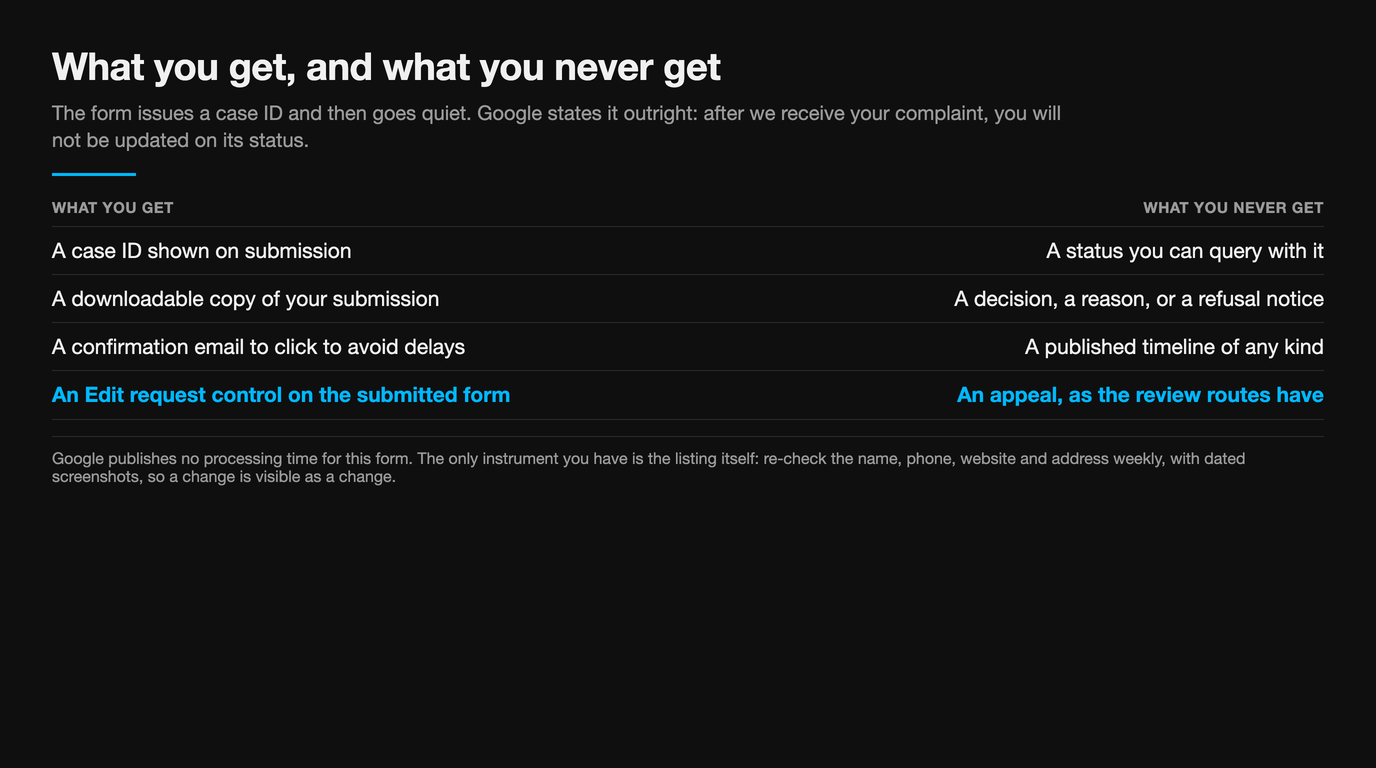
| What you get | What you never get |
|---|---|
| A case ID shown on submission | A status you can query with it |
| A downloadable copy of your submission | A decision, a reason, or a refusal notice |
| A confirmation email to click "to avoid delays" | A published timeline of any kind |
| An "Edit request" control on the submitted form | An appeal, as the review routes have |
So the only instrument you have is the listing. Re-check the name, phone, website and address weekly, and keep dated screenshots so that a change is visible as a change. A review-side dispute at least has a tracking surface; this one has none, which is the practical difference from the process in contacting Google support about a review dispute.
Treat every timeline you read with suspicion, including ours. Google publishes no processing time for this form, and the figures in circulation, a few days for a name or one to four weeks for a documented wave, are practitioner estimates with no Google source behind them. What Google commits to is the negative: no guarantee of action, and no status. A refile is reasonable when you can add facts; a refile that resubmits the same thin paragraph is not a second opinion.
Why one report is still worth filing
Be honest about the odds first. In the last year Google published a breakdown for, it took down more than 3 million fake business profiles, said "more than 90 percent" were removed before a user could see them, and attributed "more than 85 percent of these removals" to internal systems. User reports accounted for "more than 250,000". A report is a minority channel into a machine that mostly catches this before you look.
And then there is the other pattern, which is why we still file. In March 2025 Google sued an alleged network behind fake Maps listings. The case started with one complaint: a Texas business flagged an unlicensed locksmith impersonating it. That claim triggered an investigation that removed more than 10,000 illegitimate listings. Google's general counsel, Halimah DeLaine Prado, put the mechanism plainly: "Once we're alerted to the actual fraud, we take extreme efforts to identify similar fraudulent listings."
Google found the fraud concentrated in what it calls "duress verticals": services people need in a hurry, like locksmiths and towing, where a caller in trouble does not check. If you trade in one of those, your report is not only about your ranking. It is the alert that makes a cluster visible, and a cluster is what Google acts on at scale. The 2025 figures say the same from the other end: 13 million fake profiles removed, 782,000 accounts restricted, 79 million inaccurate or unverified edits blocked. Enforcement at that volume is pattern-driven, so file your one listing as part of whatever pattern it belongs to.
When not to report, and what Google actually allows
A reporting habit built on annoyance costs credibility and time. These cases look like spam to an owner and are either permitted or belong somewhere else.
| What you are looking at | Why a report fails | What to do instead |
|---|---|---|
| A competitor outranking you | Ranking is not a policy matter | Work the profile and the reviews |
| A hidden address on a service-area business | Service areas are a documented profile type | Nothing. Check the service area is plausible |
| Two businesses at one address | Allowed for distinct businesses with different names and visibly different signage | Check for a duplicate status instead |
| A name with "&", "/" or LLC in it | Permitted with real-world proof such as signage or invoices | Only report if no real-world use exists |
| A trademark or defamation problem | Out of scope for Maps reporting | Google's legal removal process, which is a separate channel |
| Reviews about a different company on your profile | Usually a merge or shared address, not a fake listing | Follow the duplicate route |
The third and last rows are the two we are asked about most, and both are their own problem rather than this one. If somebody else's reviews are sitting on your rating, start with another business's reviews on your Google profile. And if the reviews on a fake listing are the real damage, the policy grounds are set out in every Google review violation type explained.
The one-hour version
- Decide which field is wrong: title, address, phone, website, or the existence of the place. That answer picks your route.
- Capture first. Full Maps URL, dated screenshot with name and phone in frame, the offending string typed out.
- Call the number and write down what happens. A redirect is the harm mechanism the form asks you to describe.
- Search for the cluster by phone, website and name pattern, collecting the Maps URLs in a spreadsheet.
- Phantom place? In-Maps route: Suggest an edit, Place is closed or not here, Offensive, harmful, or misleading.
- Name, phone or website fraud? The redressal form, quoting the exact content and citing the guideline row it breaks.
- Ten or more listings? Submit them together, 10 to 100 at a time, with the spreadsheet.
- Click the confirmation email, then save the case ID and downloaded submission with your screenshots.
- Diary a weekly check of the listing. It is your only status signal.
A fake listing is rarely alone
Flaggd reads Google's policies against the actual content and files evidenced, single-ground disputes. Where a fake or stuffed listing is also carrying reviews that breach policy, naming the right ground on the right route is most of the work.
Flaggd is our own service. We dispute content that breaches Google policy; we do not remove or suppress content that does not, nobody can guarantee a removal, and nothing here is legal advice.
- →Impersonation on Google: how to prove and report it
- →Google review spam: how to identify and report it
- →Competitor sabotage: detecting and stopping fake review attacks
- →Another business's reviews on your Google profile
- →Google Business Profile post rejected: the 2026 fix
- →Why Google reviews are disappearing in 2026
Frequently asked questions
A fake listing is a routing problem before it is an enforcement problem. Work out which field is wrong, capture it before it changes, quote the string rather than describing your grievance, file the cluster rather than the instance, then watch the listing, because nobody will write to you. The Texas locksmith that started a 10,000-listing takedown did exactly that, once, with one profile.
- Business Redressal Complaint Form — Google Business Profile Help
- Report a business on Google Maps — Google Maps Help
- Guidelines for representing your business on Google — Google Business Profile Help
- New ways we're protecting businesses on Maps — Google, 16 April 2026
- How we fight fake business profiles on Google Maps — Google, 20 June 2019
- Google finds 10,000 fake listings on Google Maps, sues alleged network of scammers — CBS News, 19 March 2025