Key Takeaways
- The blur tool everyone points you at is written for homes, not premises. Google's wording is that "only the home owner or tenant is eligible to request a house blur", and the form asks you to select "My home" and upload proof of address. There is no commercial equivalent in the policy.
- A blur is permanent, and it reaches forward as well as back. Google states that "when we receive and apply a blur request, the blur is permanent", and it is not scoped to the panorama you complained about, so every future drive-past is blurred too. For a business that wants to be found, that is the worst outcome available.
- Eight policy categories are the only grounds that remove Street View imagery, and "our shopfront looks terrible" is not among them. The eight are about harm to people, not harm to a reputation.
- Half of these complaints are about the pin, not the photograph. If Street View opens on the unit next door, the imagery is correct and the coordinates are wrong, so it is an address edit, not an imagery report.
- Displacement is the lever that works. Google promotes a user photo into the cover slot when the owner's is weak, and publishes Photo Spheres of 7.5 MP or larger at a 2:1 ratio onto the Street View layer in about four days. You cannot delete the panorama; you can own everything around it.
- Why there is no button to remove your business from Google Street View
- The blur route is written for homes, and a storefront is not one
- A blur is permanent, and it reaches every future photograph
- The only grounds that actually remove Street View imagery
- When Street View shows the wrong building, fix the pin and not the picture
- Displacement, the lever that actually works
- If you run the business out of your own house
- What a blur does and does not do once AI is in the picture
- The twenty-minute Street View audit
- Frequently asked questions
The photograph of your shopfront on Google was taken by a car that drove past once, possibly years ago, and you have found that there is no way to remove your business from Google Street View the way you would delete a photo you uploaded yourself. The tool every guide sends you to is worse than useless here, because Google's blur page states that "only the home owner or tenant is eligible to request a house blur" and that an applied blur "is permanent", so the one lever that looks available is both closed to commercial premises and irreversible if you force it. This guide sorts the four routes that exist, names the eight policy grounds that are the only reasons Google takes Street View imagery down, shows you how to tell an imagery problem from a map-pin problem, and sets out the displacement play for the common case where nothing comes down. We read Google's Imagery Policy, its blur page, its Photo Sphere specification and its Business Profile photo criteria line by line, and scored the four guides ranking for this query against them.
Why there is no button to remove your business from Google Street View
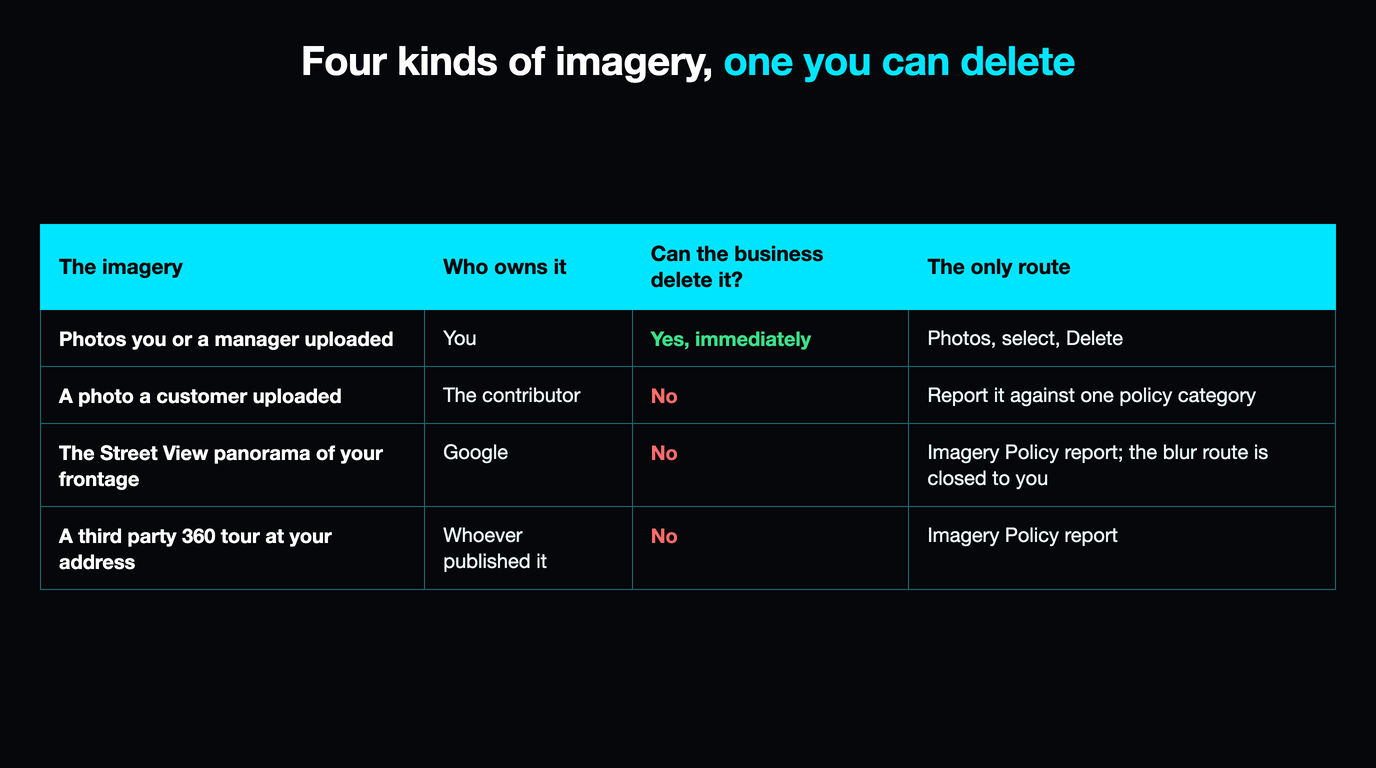
Every other image problem on a listing has an owner you can appeal to. Your own photos are yours, so you can delete them. A customer's photo belongs to that customer, so you can at least report it. The Street View panorama belongs to Google, because Google's own camera took it from a public road, and that changes the shape of the problem: you are not asking a platform to moderate somebody else's upload, you are asking a publisher to unpublish its own work.
That is why the interface offers you nothing. There is no Delete, no "this is my business" claim, and no owner-side control panel for Street View anywhere in a Business Profile. What exists instead is one public complaint form, the same one a passer-by would use, accepting a short list of specific objections.
| The imagery | Who owns it | Can the business delete it? | The only route |
|---|---|---|---|
| Photos you or a manager uploaded | You | Yes, immediately | Photos, select, Delete |
| A photo a customer uploaded | The contributor | No | Report it against one policy category |
| The Street View panorama of your frontage | No | Imagery Policy report; the blur route is closed to you | |
| A third party's 360 tour at your address | Whoever published it | No | Imagery Policy report |
Row two differs from row three in a way that matters: a reported customer photo is weighed against the contributor policies, a reported panorama against Google's policy for its own imagery. If your problem is really row two, the piece on removing customer photos from a Google Business Profile is the right guide.
The blur route is written for homes, and a storefront is not one
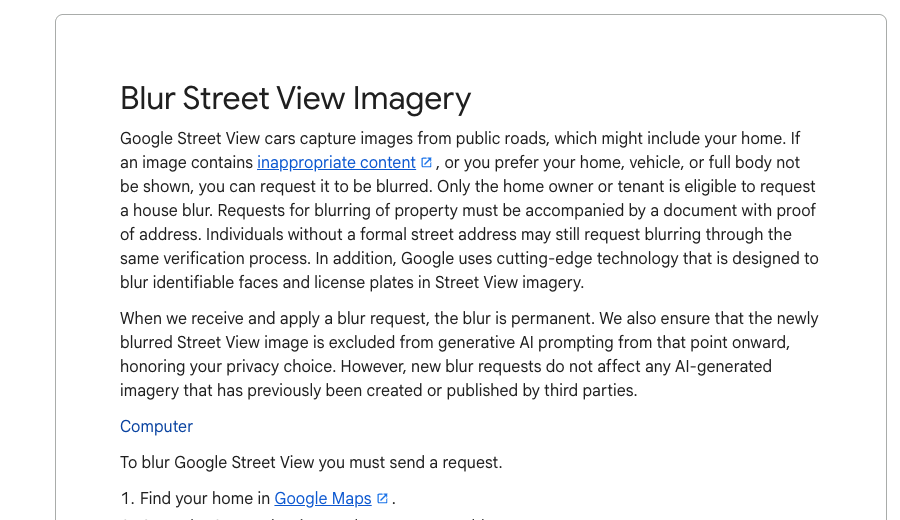
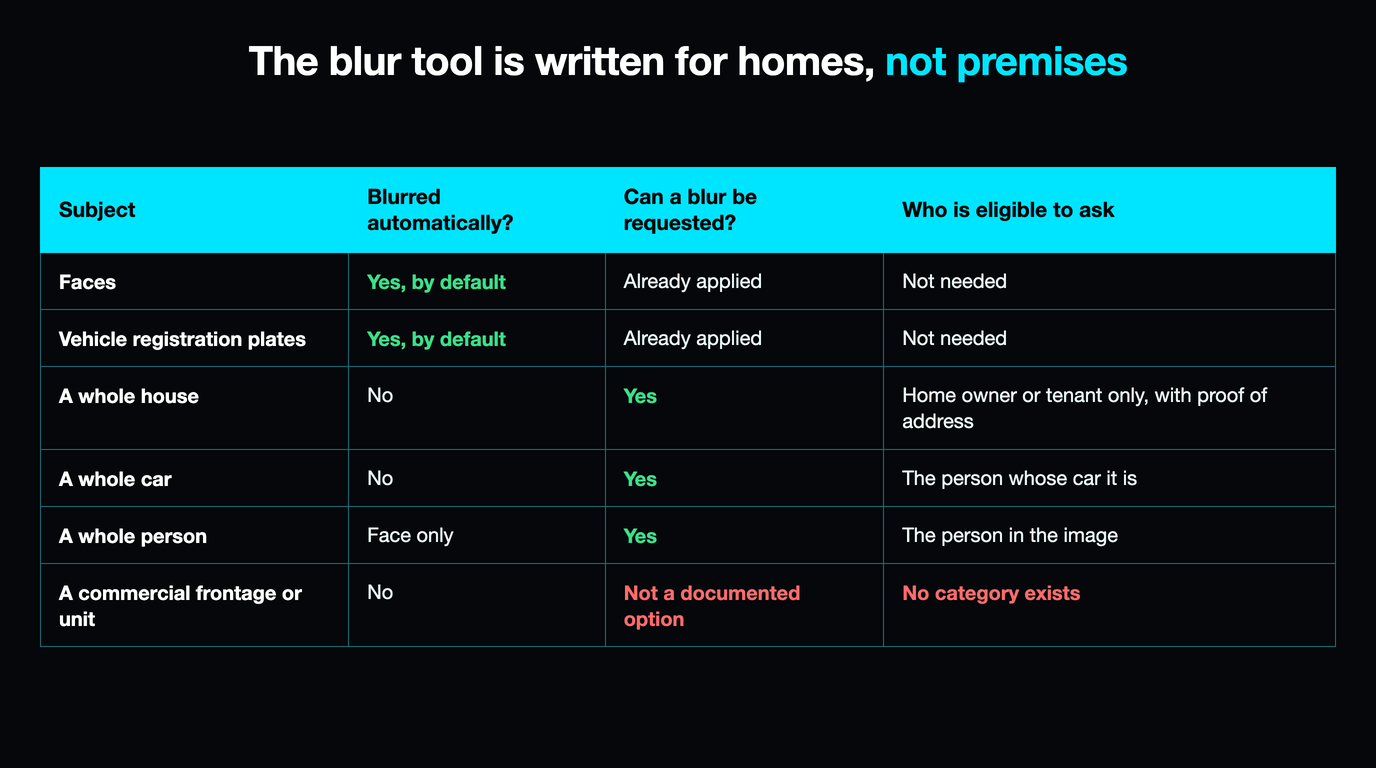
This is the finding that reorders the whole topic, and not one of the four guides ranking for this query states it. Google's blur page is explicit: "Only the home owner or tenant is eligible to request a house blur." The flow bears it out at every step: you open Street View, click Report a Problem, then select My home, certify your authority, upload proof of address and type the residential address. There is no selector for a shop, a unit, a yard or an office.
The older privacy page is phrased more loosely, offering tools to blur "any image that features the user, their family, their car or their home", and that looseness is where the bad advice comes from. Notice what is actually on the list: a person, a vehicle, a dwelling. Commercial premises appear nowhere, and Google's Street View Imagery Policy contains no business or commercial-property section at all.
| Subject | Blurred automatically? | Can a blur be requested? | Who is eligible to ask |
|---|---|---|---|
| Faces | Yes, by default | Already applied | Not needed |
| Vehicle registration plates | Yes, by default | Already applied | Not needed |
| A whole house | No | Yes | Home owner or tenant only, with proof of address |
| A whole car | No | Yes | The person whose car it is |
| A whole person | Face only | Yes | The person in the image |
| A commercial frontage or unit | No | Not a documented option | No category exists |
Data-protection law does not rescue the bottom row either. Ireland's Data Protection Commission, answering this exact complaint, tells individuals to use Google's report link and states plainly that street views of property do not constitute personal data. A building is not a person, so the framework that gets a householder a blur gives a company nothing to object with.
A blur is permanent, and it reaches every future photograph
Suppose you get a blur anyway, because the premises are also a dwelling or because a form was filled in loosely. Read what you have bought. Google's wording is that "when we receive and apply a blur request, the blur is permanent", and that permanence is not scoped to the panorama you complained about. A blur attaches to the location, so it survives the next drive-past, and the one after that.
The form lets you nominate "a different object", which reads like a scalpel and is not one. Blurring is applied generously, so a request aimed at one detail can return a frontage that is entirely smeared, and because the result is permanent there is no appeal and no undo. A business that asked for a sign to be softened and got a grey rectangle where its shop used to be has no route back.
So the blur route is not merely closed to businesses, it is the outcome a business should most want to avoid. A customer checking whether your premises look legitimate does not read a blur as privacy; they read it as something hidden. You are choosing between a dated photograph of your frontage and none at all, forever, and the dated one is almost always better for you.
The only grounds that actually remove Street View imagery
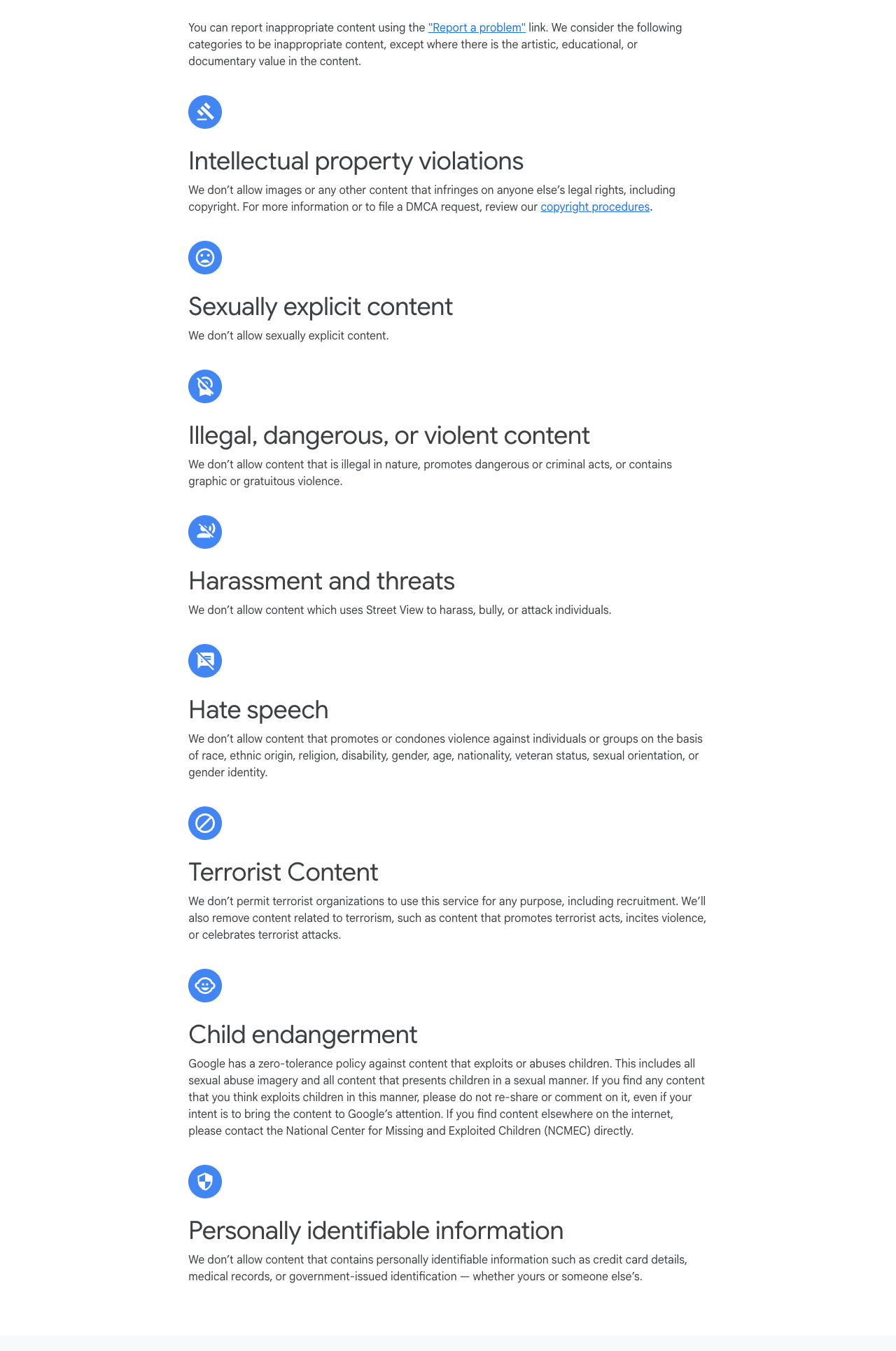
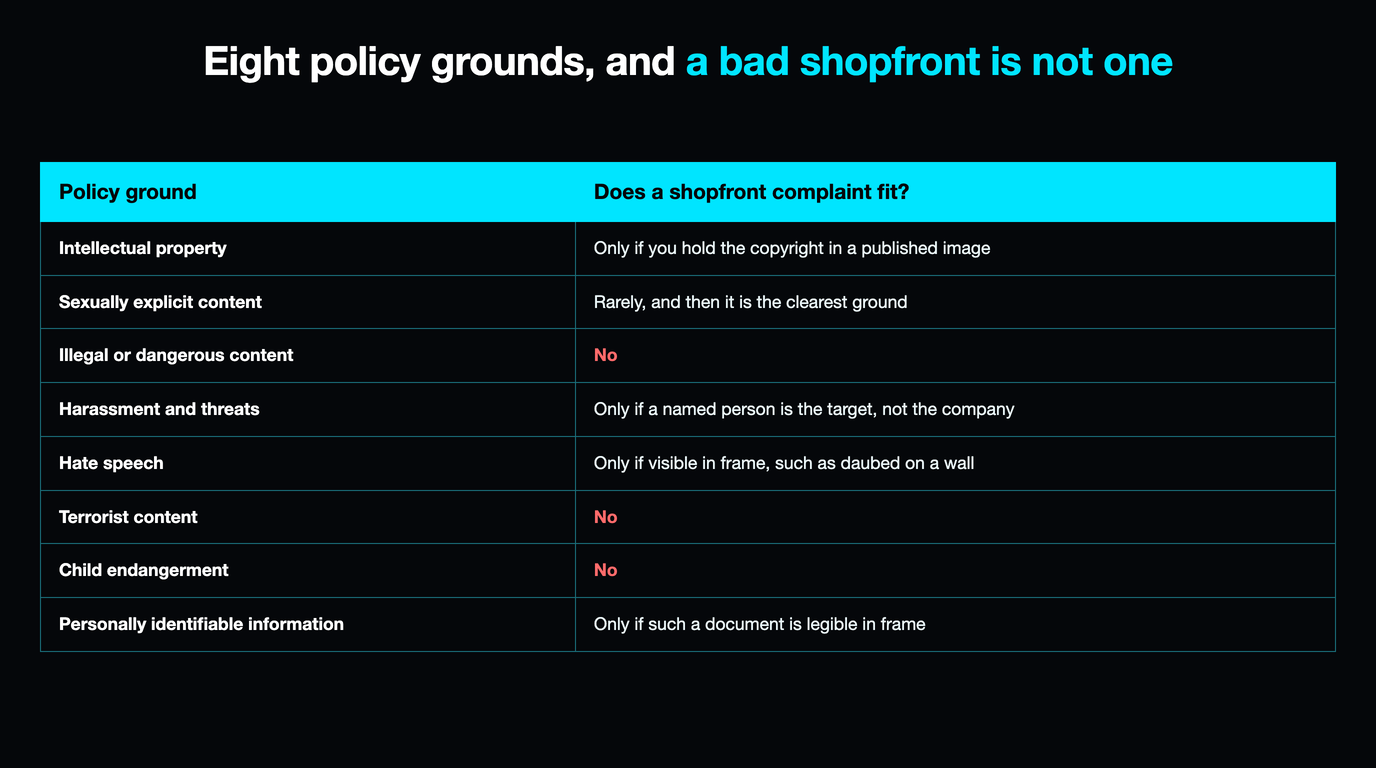
Google's Street View Imagery Policy does list content it will take down, and the list is short, specific and almost entirely about harm to people rather than to reputations. Working out whether your complaint fits one of these before you file is the highest-value thing you can do, for the same reason it matters in every Google review policy violation type: a report under a category that does not fit is not a near miss, it is a decline.
| Policy ground | What it covers | Does a shopfront complaint fit? |
|---|---|---|
| Intellectual property | Infringes anyone's legal rights, copyright included | Only if you hold the copyright in a published image |
| Sexually explicit content | Explicit imagery, not allowed | Rarely, and then it is the clearest ground |
| Illegal or dangerous content | Illegal or criminal acts, graphic or gratuitous violence | No |
| Harassment and threats | Harassing, bullying or attacking individuals | Only if a named person is the target, not the company |
| Hate speech | Promoting or condoning violence against people or groups | Only if visible in frame, such as daubed on a wall |
| Terrorist content | Use by terrorist organisations for any purpose | No |
| Child endangerment | Zero tolerance for content exploiting children | No |
| Personally identifiable information | Credit card details, medical records, government-issued identification | Only if such a document is legible in frame |
Read down the right-hand column and the absence is the point. There is no category for "this makes us look bad." A dirty frontage, a predecessor's signage, scaffolding, a skip, a boarded window, a bin store in shot: every one is an accurate photograph of a place the camera was entitled to be, and no ground reaches any of them. The rows that can apply are worth taking seriously though, and the hate-speech row in particular catches graffiti owners assume is their own problem to paint over.
Where a row does fit, treat it like any evidenced dispute: screenshot the panorama with its capture date visible, note which sentence of the policy it breaks, and file once. The discipline in documenting evidence for a Google dispute transfers exactly.
When Street View shows the wrong building, fix the pin and not the picture
A large share of these complaints are not about the imagery at all. Street View opens wherever the listing's coordinates sit, so a pin dropped on the next unit along, or on the rear of a building, shows a stranger's shop while the photograph itself is perfectly correct. Reporting the picture achieves nothing, because nothing is wrong with the picture. Sort the symptom first: the four cases below have four different routes, and picking the wrong one costs you a fortnight.
| What you are seeing | Actual cause | The route | What to expect |
|---|---|---|---|
| The view opens on the unit next door | Your coordinates | Correct the address on your profile | Changes are reviewed; a relocation means re-verifying |
| The frontage shows the previous tenant | The capture predates your tenancy | No removal route; displace instead | Nothing changes until a re-drive or your own imagery |
| Blurry, badly stitched, or the arrows jump | An imagery fault on Google's side | Report a Problem, image-quality branch | Flags the location; no committed timeline |
| A person or a legible document in frame | Privacy, and the stronger ground | They request their own blur, or you file the PII ground | Permanent once applied; scope it narrowly |
Row one deserves care rather than speed. Google says it reviews profile changes before they go live, and its address guidance is blunt that if you have moved after verification "you must verify your business again". An edit made casually to nudge a thumbnail can therefore put the whole profile back into a verification queue, a far bigger problem than an ugly photograph, with its own recovery path in our guide to a Business Profile suspended after a dispute.
Displacement, the lever that actually works
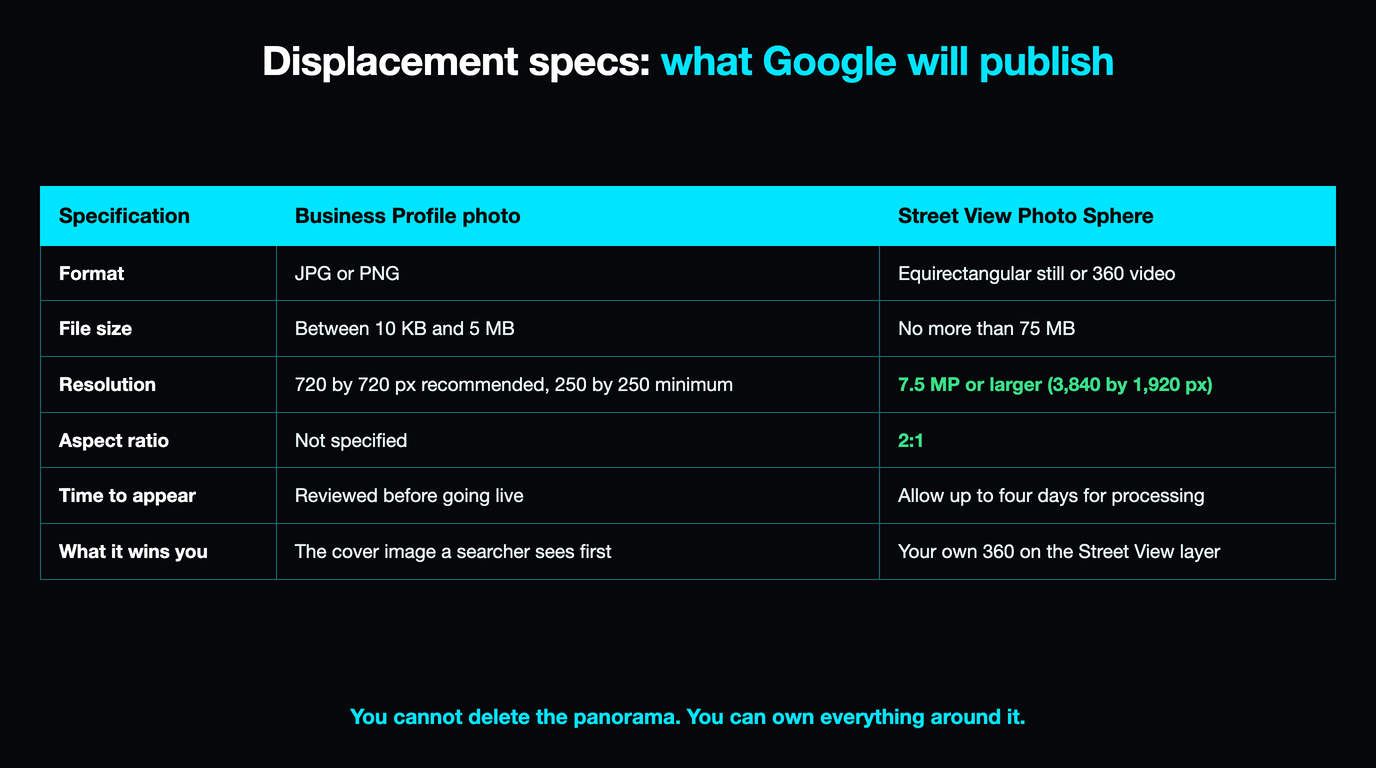
Here is the part that pays. You cannot unpublish Google's panorama, but you have two live routes to put better imagery in front of it, both specified in Google's own documentation with numbers you can meet today.
The first is the cover slot. Google's photo criteria state that where "the cover photo you select is low-quality or if other sources suggest that it's not the best photo to represent your business, a user-submitted photo may be selected instead". Owners read that as a threat. Read it as a contest with published rules: meet the criteria better than anyone else and the slot is yours.
The second is the Street View layer itself. Google accepts Photo Spheres from anyone and documents the specification exactly, so a compliant 360 shot from your own doorway appears at your address beside the drive-past.
| Specification | Business Profile photo | Street View Photo Sphere |
|---|---|---|
| Format | JPG or PNG | Equirectangular still or 360 video |
| File size | Between 10 KB and 5 MB | No more than 75 MB |
| Resolution | 720 by 720 px recommended, 250 by 250 minimum | 7.5 MP or larger (3,840 by 1,920 px) |
| Aspect ratio | Not specified | 2:1 |
| Quality bar | "In focus and well lit", "no significant alterations or excessive use of filters" | No horizon gaps, no significant stitching errors, sharp focus, detail in light and dark |
| Time to appear | Reviewed before going live | Allow up to four days for processing |
| What it wins you | The cover image a searcher sees first | Your own 360 on the Street View layer |
The filters clause is the one that catches people, and it is why a business that paid a photographer loses the cover slot to a customer's phone snap: a heavily graded hero shot can read as a significant alteration. Shoot it clean, shoot it bright, and shoot enough that your recent imagery outnumbers everybody else's. At scale, the Street View Publish API does this across sites, which is the answer for the multi-branch case in reputation management for multi-location businesses. The wider version of the work sits in Business Profile optimisation for local SEO.
If you run the business out of your own house
This is the one case where the blur route is genuinely open to you, because the eligibility test is about the property rather than the trade. You are the home owner or tenant, you can certify it, and you can produce proof of address. Plumbers, consultants, groomers, bookkeepers and anyone else trading from a residential address can use the form as written.
Think hard first, and separate two different wishes. If you want strangers to stop seeing your family home, the blur does that and the permanence is a feature. If you only want the listing to stop leading with a picture of a house, it is the wrong instrument: a blurred dwelling is a permanent grey smear at your trading address, and it will still be there if you later take a unit on the high street.
The lighter move is usually to run as a service-area business, so the address is not displayed publicly, and to carry strong photographs of work in progress rather than of premises. Go carefully there too: changing how an address is handled on a verified profile is exactly the edit that puts a profile back in front of a reviewer.
What a blur does and does not do once AI is in the picture
Street View imagery now feeds generative models, and Google has written that into the blur page in terms worth reading closely. A newly blurred image is "excluded from generative AI prompting from that point onward", and the policy adds that where this imagery trains generative models, further filtering strips full bodies and vehicles.
Then comes the sentence that sets the real limit: "new blur requests do not affect any AI-generated imagery that has previously been created or published by third parties." A blur is forward-looking only. Anything already generated from the old panorama, anywhere outside Google, stays exactly where it is, and nothing in this process reaches it.
That matters in a specific way. Copies of your frontage are propagating into places with no complaint form, so "how do I get this image taken down" is becoming unanswerable in the general case, while "what is the best current image of my premises, and is it mine" is entirely answerable. That is an argument for publishing, and it gets stronger every month.
The twenty-minute Street View audit
Do this once, in order, before you file anything. Open your listing on Maps, click into Street View, and note the capture date in the corner.
- Is this even the right building? If the camera is outside somebody else's door, stop. That is an address problem, not an imagery problem, and it is row one above.
- Does anything in frame hit one of the eight grounds? Graffiti carrying a protected-characteristic slur, explicit content, a readable document. If so, screenshot it, quote the policy line, file once.
- Is a person recognisable beyond the automatic face blur? That is their request to make, not yours, so tell them rather than filing for them.
- Is the complaint only that it looks bad or old? Then accept that no removal route exists and move the whole effort to displacement.
- Shoot the frontage properly. Clean, bright, no heavy grading, plus a compliant Photo Sphere from the doorway if you have a 360 camera.
- Diarise the capture date. Check within a week of any re-drive, because a fresh panorama is the only thing that replaces the old one.
Step four is the one people skip and the one that saves the month. Deciding early that a photograph is not removable is not giving up, it is redirecting effort from a queue that will decline you to a contest you can win.
One ground, one report, filed properly
Flaggd reads the policy against your actual evidence and files evidenced, single-ground content disputes, which matters most on surfaces like this one where the categories are narrow and a declined report has nowhere to go.
Flaggd is our own service. We dispute content that breaches Google policy; we do not remove or suppress content that does not, and nobody can guarantee a removal.
Frequently asked questions
Can I remove my business from Google Street View?
Not as a general matter. The panorama is Google's own imagery, shot from a public road, so there is no owner-side delete and no claim process in a Business Profile. Google removes Street View imagery only on the grounds in its Street View Imagery Policy: copyright, sexually explicit content, illegal or violent content, harassment, hate speech, terrorist content, child endangerment and personally identifiable information. An accurate but unflattering shopfront fits none of them.
Can a business request that its storefront be blurred on Street View?
There is no documented route for it. Google's blur page states that only the home owner or tenant is eligible to request a house blur, and the form asks you to select "My home", certify your authority and upload proof of address. The older privacy page offers blurring for "the user, their family, their car or their home". Commercial premises appear on neither list, and the Imagery Policy has no commercial-property section at all.
Is Google Street View blurring permanent?
Yes. Google states that when it receives and applies a blur request, the blur is permanent. It attaches to the location rather than the single panorama you complained about, so future captures of the address are blurred too. There is no undo and no appeal, and because blurring is applied generously a request aimed at one detail can return a frontage that is entirely obscured.
Why does Street View show the building next door to my business?
Because Street View opens at your listing's coordinates, so this is almost always a pin problem rather than an imagery problem. Correct the address on your profile rather than reporting the photograph, but do it deliberately: Google reviews changes before they go live, and its address guidance says that if you relocated after verification you must verify again, so a casual edit can put the profile back into a verification queue.
Can I replace the Street View image of my business with my own photo?
You cannot swap out Google's drive-past panorama, but you can publish your own 360 imagery onto the Street View layer at your address. The Photo Sphere specification is 7.5 MP or larger, meaning 3,840 by 1,920 pixels, at a 2:1 ratio and no more than 75 MB, with no horizon gaps and no significant stitching errors, and Google says to allow up to four days for processing. At scale, the Street View Publish API does the same job.
How do I get Google to re-photograph my street?
You cannot book it. Google publishes no request route for a fresh capture and commits to no timeline; re-capture follows its own camera schedule. You can use the Report a Problem image-quality branch to flag a panorama that is blurry, badly stitched or misaligned, which marks the location for attention, and publish your own compliant Photo Sphere meanwhile so there is current imagery at your address either way.
My business runs from my house. Can I blur it?
Yes, because the eligibility test is about the property rather than the trade, so as the home owner or tenant you can use the form as written. Decide what you want first. If the goal is that strangers stop seeing your family home, the blur does that and the permanence helps. If the goal is only that your listing stops leading with a picture of a house, a permanent grey smear at your trading address is the wrong instrument, and running as a service-area business is usually the lighter move.
Is Street View imagery of my business used to train AI, and does a blur stop it?
Google says a newly blurred image is excluded from generative AI prompting from that point onward, and that where Street View imagery trains generative models further filtering removes full bodies and vehicles. The limit is stated just as plainly: new blur requests do not affect any AI-generated imagery previously created or published by third parties. A blur is forward-looking only, so anything already generated from the old panorama stays where it is.
The removal question on this surface is mostly settled before you ask it, and the four guides ranking for it spend their length on a form that was never written for you. Establish which of the four cases you are in, file once if a policy ground genuinely fits, then put the rest of the effort where the rules are published and the contest is open: a clean, current, compliant set of your own imagery at your own address. That is the part a customer sees.