Key Takeaways
- A transfer keeps everything. A deletion destroys the half you wrote. Google says moving primary ownership "ensures all of your business info, like reviews, are maintained", and that a removed user's "replies to reviews, posts, comments, and other actions stay on the Business Profile". Remove the profile instead and "any posts, photos, videos, and review replies by owners and managers are permanently removed".
- The seven-day lockout decides the order, and that is the whole job. "When you become a profile owner or manager, you have to wait 7 days before you can manage some profile features" - removing other users is one of them. If the agency transfers ownership and waits for you to evict them, you cannot for a week. If they remove themselves straight after transferring, it takes minutes.
- The agency cannot simply walk away first. "If you're the primary owner, you can't remove yourself until after you transfer primary ownership to someone else." An agency that says it has already left has either transferred the role to someone or is still holding it.
- Google's policy obliges them. Authorised representatives must "always transfer Business Profile ownership to the business owner immediately upon request", and Google lists ownership being revoked when "the business confirmed that you or your agency is no longer authorized to manage this page".
- None of the three guides ranking for this treats it as a sequence. Reading them on 23 November 2026: one omits the seven-day rule entirely and contradicts its own steps, one covers the rule but never connects it to the order, and none mentions the representative policy or carries a single table.
- Four routes out, and only one keeps your replies
- What survives the handover, in Google's own words
- The seven-day lockout decides the order
- The sequence that loses nothing, step by step
- Owner or manager: what each role can actually do
- When the agency stalls, Google's policy is on your side
- What to capture before anyone touches a role
- After the handover: three checks in week one
- Frequently asked questions
The old agency is out, the new one starts on Monday, and the Google Business Profile carrying three hundred reviews is still sitting in an account nobody at your company can sign into. Transfer a Google Business Profile from an agency in the wrong order and you lose the half of your review history you wrote yourself: every reply, every post, every photo an owner or manager uploaded, and Google says plainly that once that content goes "it can't be recovered or managed". Do it in the right order and the whole thing takes about ten minutes, nothing moves except two names in one list, and not a single review or reply changes. We read Google's five ownership and eligibility pages on 23 November 2026, alongside the three guides currently ranking above them, and the order of operations is the one thing none of those three gets right.
This is the cooperative version of the job, where somebody at the agency will still answer an email. If nobody will, the route is different and we have written it up separately in our guide to Google Business Profile access requests, where Google gives the current owner three days to respond and the cost of the fallback is measured in deleted replies.
Four ways a Google Business Profile leaves an agency, and only one keeps your replies
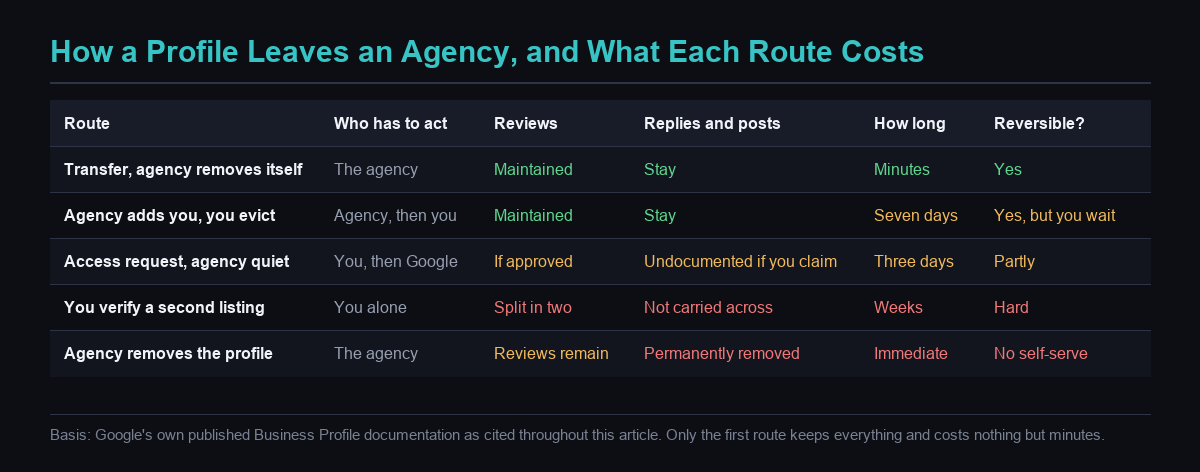
There are four ways a profile actually leaves an agency, and owners tend to pick by what sounds decisive rather than by what it costs. The difference between them is not speed or paperwork. It is whether the content on the profile is attached to the profile or to the account that posted it, because the two behave differently when a user leaves.
Reviews are attached to the profile. Your replies, posts, photos and videos are attached to the profile too, which is why Google can say they survive a user being removed. What does not survive is the profile itself being removed, or being abandoned in favour of a second listing for the same business. Those are the two routes that cost you something, and they are the two that look like progress while you are doing them.
| Route | Who has to act | Reviews | Replies, posts and owner photos | How long | Reversible? |
|---|---|---|---|---|---|
| Transfer, then the agency removes itself | The agency | Maintained | Stay | Minutes | Yes |
| Agency adds you as owner and leaves you to evict them | Agency, then you | Maintained | Stay | Seven days | Yes, but you wait |
| Access request, because the agency went quiet | You, then Google | Maintained if approved | Stay if approved; undocumented if you claim instead | Three days | Partly |
| You verify a second listing | You alone | Split across two records | Not carried across | Weeks | Hard: invites a merge or a suspension |
| Agency removes the profile | The agency | Reviews remain | Permanently removed | Immediate | No self-serve route |
The first row is the target. The second is the same destination reached in the wrong order, and it is the single most common way a clean handover turns into a week of being locked out of your own user list. The fourth row is the one to refuse outright: a second listing for one business is a duplicate, and we have written about what that costs in duplicate Business Profile reviews. Which leaves the question the table cannot answer on its own - what exactly does Google promise survives?
What survives the handover, in Google's own words
Three sentences across three of Google's help pages settle this, and they are worth having in front of you when you write to the agency, because they convert a nervous request into a technical instruction. They come from the primary-ownership transfer page, the owners-and-managers pages, and the page on removing a profile.
On transferring: moving primary ownership "ensures all of your business info, like reviews, are maintained".
On removing a user: a removed owner or manager "can't change business info or do admin tasks", but "their replies to reviews, posts, comments, and other actions stay on the Business Profile".
On removing the profile: "Any posts, photos, videos, and review replies by owners and managers are permanently removed." "User-generated content and review remains."
Read together they draw a hard line. Moving people is safe. Moving the profile is not. The replies the agency wrote over four years stay where they are when the agency leaves, which also answers a question owners are oddly reluctant to ask out loud: no, you do not lose the agency's work by removing the agency.
The third sentence is worth quoting back if anyone proposes a fresh start. A removal takes out owner and manager content permanently while leaving the reviews in place, so you end up with the reviews you were worried about and none of the responses that made them look answered. Owner photos sit in that same category, and the question of who owns them at all is a separate tangle we cover in who owns photos of your business. So the safe route is settled. What decides whether it goes smoothly or stalls for a week is the clock Google starts the moment anyone new is added.
The seven-day lockout decides the order you do this in
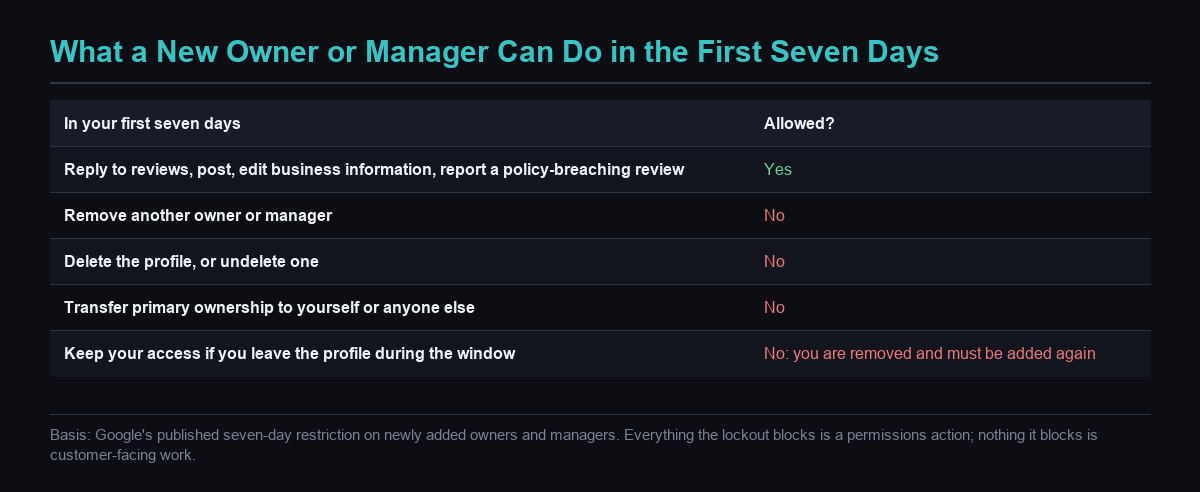
Google puts it in one sentence: "When you become a profile owner or manager, you have to wait 7 days before you can manage some profile features." "Some features" is doing a lot of work there, so here is what the restriction actually covers.
| In your first seven days as a new owner or manager | Allowed? |
|---|---|
| Reply to reviews, post, edit business information, report a policy-breaching review | Yes |
| Remove another owner or manager | No |
| Delete the profile, or undelete one | No |
| Transfer primary ownership to yourself or anyone else | No |
| Keep your access if you leave the profile during the window | No: you are removed and must be added again |
Now put that beside the thing an outgoing agency most often says, which is some version of "you are the owner now, take us off whenever you like". You cannot. For seven days you hold the senior role on the profile and no ability to use the one part of it that matters in a handover. The agency keeps live access to a profile it no longer works on, through a window during which you have no mechanism to end it.
For the record, BrightLocal and Sterling Sky both document the window correctly, and Birdeye's guide does not mention it at all. What none of the three does is connect it to the order of operations, which is the only decision in the job.
The same clause bites in the other direction too. An agency user who was themselves added recently cannot hand the role on: Google returns an error if an owner or manager tries to transfer primary ownership inside their own first seven days. If the agency rotated the account managing your profile last Tuesday, your handover is already waiting on a clock nobody mentioned.
One more trap sits in the last row of that table: a new owner who gets impatient and removes themselves during the window does not drop to manager, they leave the profile and must be added again, which restarts the seven days. The way out is not a workaround. It is doing the two actions in the order that never touches the lockout at all.
The sequence that loses nothing, step by step
The whole sequence rests on one asymmetry: the lockout restricts the newcomer, not the incumbent. The agency has held its role for years, so nothing in that table applies to it. Every action that the window would block in your hands is an action the agency can still take today, in seconds. So the agency does both halves while you do nothing, and the order is the deliverable.
- Create or nominate the Google account that will own this permanently. A personal address belonging to a staff member who may leave is how profiles end up back in this article. Use an account the business controls, and know its password.
- Capture the profile as it stands today (the next section lists exactly what, and why screenshots are the only method that captures it).
- Ask the agency, in writing, for two things in one message: add your account as an owner, then transfer primary ownership to it, then remove their own users. Say "in that order" and quote the seven-day rule. Vagueness here is what produces the manager-access-only version of a handover.
- Agency adds your account as an owner. Google's path: More, then Business Profile settings, then People and access, then Add. Accept the invitation from the email that arrives.
- Agency transfers primary ownership to your account. Same People and access screen: select your user, Edit next to Access, choose Primary owner, Save. Google notes the transfer is immediate and needs no confirmation from the new primary owner, and that a profile "must have at least one other owner or manager to transfer primary owner access to" - which is why step 4 cannot be skipped.
- Agency removes its own users, in the same sitting. This is the step that gets postponed and must not be. Their former primary owner can now remove themselves, because Google's restriction is only that "you can't remove yourself until after you transfer primary ownership to someone else" - a condition step 5 has just satisfied. Any other agency staff on the profile come off here too.
- Verify the user list yourself before you close the thread. Open People and access and read every row. This is the only evidence you have that the handover finished rather than half-finished.
The one-line version to send them: "Please add [account] as an Owner, then set it as Primary owner, then remove your own users, all in the same session. Google's seven-day restriction means that if you leave the removal to us we cannot act on it for a week."
Steps 4, 5 and 6 are three screens in one interface and take about two minutes, and none of them touches the profile's content: at no stage has anybody removed a profile, verified a listing or created anything new. The remaining question is what role to ask for, because asking for the wrong one is how a handover becomes a half-handover.
Owner or manager: what each role can actually do
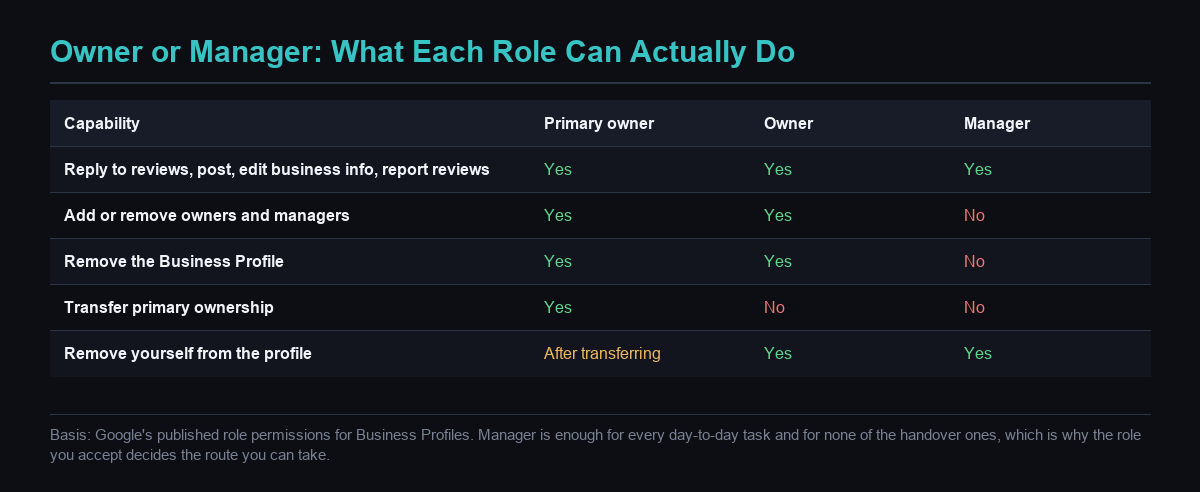
Google is specific about the difference, and it is narrower than the names suggest. Managers have "mostly the same access to the profile as owners" with one exception: "they can't add or remove users or remove the profile." A profile "can have multiple owners but only one primary owner".
| Capability | Primary owner | Owner | Manager |
|---|---|---|---|
| Reply to reviews, post, edit business info, report reviews | Yes | Yes | Yes |
| Add or remove owners and managers | Yes | Yes | No |
| Remove the Business Profile | Yes | Yes | No |
| Transfer primary ownership | Yes | No | No |
| Remove yourself from the profile | Only after transferring the role | Yes | Yes |
For the day-to-day work of defending a profile, manager access is enough: you can reply to everything and report the reviews that breach Google's policies. That is why manager access is the right first ask when you are locked out and in a hurry, and we make that case in the access request guide.
In a planned agency handover it is the wrong ask. Manager access leaves the agency holding the only role that can add and remove users, which means they can remove you and you cannot remove them. Ask for owner, then primary owner. If the agency offers manager access and calls it a handover, it is not one.
One small thing that catches multi-site operators: Google does not allow a Google Group to hold either role - "You can't add Google Groups as managers or owners of profiles" - so a shared marketing@ group address is not a route to shared ownership. All of which assumes the agency is cooperating. When it is not, the policy you need is on a page nobody links to.
When the agency stalls, Google's own policy is on your side
Google's business eligibility and ownership guidelines classify an agency managing a profile it does not own as an authorised representative: "Any individual or company that manages business information for a Business Profile that they don't own." The obligations attached to that status are written in plainer language than most of Google's policies, and they are the most useful thing in this article if your handover has stalled.
Authorised representatives must:
- "Never claim a Business Profile without express consent from the business owner."
- "Always respond to management access requests promptly."
- "Always transfer Business Profile ownership to the business owner immediately upon request."
Google also says that where possible, representatives should encourage the owner to "create an account, own the Business Profile, and add authorized representatives as managers" - which is the arrangement you are building, described by Google as the one agencies should have set up in the first place.
Quote the third bullet. "Immediately upon request" is Google's wording, not yours, and it reframes the conversation: you are not asking for a favour at the end of a contract, you are asking them to meet a condition of the access they have been using.
If that produces nothing, Google's eligibility page lists the circumstances in which ownership or management access may be revoked, and two of them describe exactly this situation: "the business confirmed that you or your agency is no longer authorized to manage this page", and being unreachable "by email after multiple attempts to confirm your affiliation with the business". Those are grounds Google acts on, not a complaints procedure you can file directly, so the practical move is still the access request - but you make it knowing the policy reads your way.
The timing on that route is documented and short. Google notifies the current owner, who "has 3 days to respond", and "if you don't get a response after 3 days, you may have the option to claim the profile", with the caveat that "the option to claim a profile isn't always available". Before you start any of that, though, there is twenty minutes of work that is only possible while the profile is still intact.
What to capture before anyone touches a role
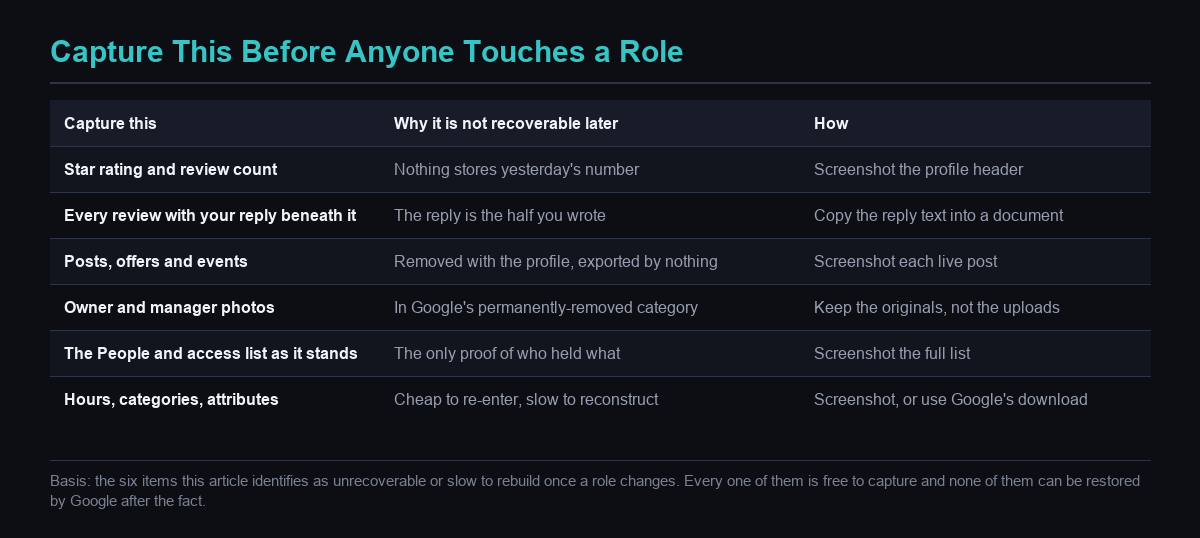
Google's data download tools cover business information. They do not cover the things you would actually mourn, and the only method that captures those is the dull one: screenshots, taken before anybody edits a role.
| Capture this | Why it is not recoverable later | How |
|---|---|---|
| Star rating and review count | Nothing stores yesterday's number | Screenshot the profile header |
| Every review with your reply beneath it | The reply is the half you wrote, and a removal destroys it | Copy the reply text into a document |
| Posts, offers and events | Removed with the profile, exported by nothing | Screenshot each live post |
| Owner and manager photos | In Google's permanently-removed category | Keep the originals, not the uploads |
| The People and access list as it stands | The only proof of who held what | Screenshot the full list |
| Hours, categories, attributes, description | Cheap to re-enter, slow to reconstruct | Screenshot, or use Google's download |
The second row is the one worth the time. In the cooperative handover described here none of it is at risk, but you are about to depend on somebody else performing three steps correctly in an interface you cannot see, and a twenty-minute copy-and-paste is a cheap hedge against the version that goes wrong. Capture the user list too: if the agency later says it removed its people and the profile says otherwise, that screenshot is the difference between a conversation and an argument.
After the handover: three checks in week one
First, read the user list again a few days later. Handovers get half-done: the role moves and two agency staff accounts stay on as managers because nobody enumerated them. You can remove those yourself once your own seven days are up.
Second, check whether the profile sits inside a location group. Agencies managing many locations often hold them in a group, and access granted at group level does not appear the way a single-profile user does. If the profile was administered that way, confirm your account is on the profile itself and not only on a group the agency still controls.
Third, deal with the reviews nobody was ever going to report. This is the part of a handover that quietly costs the most. A profile managed at arm's length for years usually carries reviews that breach Google's content policies and were never disputed: ex-employees, competitors, people who were never customers, complaints about a business at the same address. Replying to them was the agency's job. Reporting them was nobody's.
Now that you hold the senior role, the policy-violation reporting route is open to you, and it is the one lever on this profile that can change the rating rather than merely answer it. If the profile changed hands as part of a sale rather than an agency switch, our guide to buying a business with bad Google reviews covers which of the inherited reviews are disputable at all.
You have the profile back. Now read what is on it
A profile managed at arm's length for years is usually carrying reviews nobody ever reported. Flaggd reads every review on the profile against Google's content policies, names the clause each one breaches, and files the evidenced dispute for you.
Flaggd is our own service and this page recommends it. We dispute review content that breaches Google policy on profiles our clients control. We are not a law firm, we do not give legal advice, and we cannot transfer a Business Profile on Google's behalf, compel an agency to release one, recover deleted review replies, or guarantee that any access request is approved. Google's primary-ownership, owners-and-managers, add-and-remove-users, profile-removal, request-ownership and business-eligibility help pages were read on 23 November 2026; the assessment of the other guides is our own reading of those pages on that date.
Frequently asked questions
Can my agency transfer my Google Business Profile without deleting anything?
Yes, and it is the only route worth using. Google says transferring primary ownership "ensures all of your business info, like reviews, are maintained", and that a removed user's "replies to reviews, posts, comments, and other actions stay on the Business Profile". Moving people between roles deletes nothing. Removing the profile is the destructive action, and it takes owner and manager content with it permanently.
How long does a Google Business Profile ownership transfer take?
The transfer itself is immediate: Google says it happens on Save and needs no confirmation from the new primary owner. What takes time is the seven-day restriction on whoever was added most recently, which blocks removing other users. Done in the right order the handover is a two-minute job.
Why can I not remove the agency after they made me the primary owner?
Because the restriction follows the newest user, not the junior one. A new owner or manager must wait seven days before they can remove other owners and managers. The agency has held its role for years, so nothing stops it from removing itself the moment the transfer completes - which is why that step belongs in the same session.
Do the agency's replies to reviews disappear when I remove them?
No. A removed user "can't change business info or do admin tasks", but Google states that "their replies to reviews, posts, comments, and other actions stay on the Business Profile". You are not deleting four years of responses by taking their accounts off.
What if the agency refuses to transfer ownership?
Quote the policy at them: authorised representatives must "always transfer Business Profile ownership to the business owner immediately upon request" and "always respond to management access requests promptly". If that fails, file an access request - the owner "has 3 days to respond", and after that you "may have the option to claim the profile", though Google warns that option "isn't always available". Claiming by verification is the route where your replies are at risk, so treat it as the fallback it is.
Should I ask for owner or manager access in a handover?
Owner, then primary owner. Managers have "mostly the same access to the profile as owners" except that "they can't add or remove users or remove the profile", and in a handover that single exception is the whole point: a manager cannot remove the agency, while the agency can still remove a manager. Manager access is the right first ask only when you are locked out and need to reply to something today.
Can I just create a new Business Profile instead?
No. A second listing for one business is a duplicate: it splits the reviews, carries none of your replies across, and can draw a suspension. The reviews you are trying to protect stay on the old record regardless. Move the people, not the listing.