Key Takeaways
- Review extortion is a federal crime — threatening reviews to coerce money or concessions violates state extortion statutes and federal Internet fraud laws (18 U.S.C. 875).
- Report to Google first. Flag the extortionate review in your Business Profile and email Google's Trust & Safety team. Google removes coordinated inauthentic behavior and extortion attempts within days.
- File an FBI complaint at ic3.gov. The FBI's Internet Crime Complaint Center investigates cyberextortion. Federal involvement strengthens your case and signals seriousness to local law enforcement.
- File a local police report immediately. Establish a police case number. Bring all evidence: screenshots, messages, timeline, and proof of demands. This creates an official record for civil claims and other agency investigations.
- Contact your state attorney general. State AGs pursue extortion schemes, especially when multiple businesses are targeted. The consumer protection division is your entry point.
- Why reporting order matters: Google first, then FBI, then police
- Reporting through Google Business Profile: step-by-step
- Contacting Google's Trust & Safety team directly
- Filing an FBI Internet Crime Complaint (IC3)
- Filing a police report with your local department
- Reporting to your state attorney general
- Follow-up, case tracking, and escalation

Review extortion is a specific, prosecutable crime — and it is more common than most business owners realize. The scenario is straightforward and chilling: someone posts or threatens to post a negative review unless you pay them money, give them a refund, provide free services, or comply with some other demand. The extortionist may claim they had a bad experience (sometimes truthfully, sometimes fabricated), or they may openly state that the threat is purely financial — "pay me $500 or I'll leave you a one-star review across all platforms." In some cases, the extortionist targets multiple businesses with the same threat, running a systematic shakedown operation.
What makes review extortion distinct from ordinary negative reviews is the coercive demand. A customer who is genuinely angry and leaves a negative review is exercising their right to share their experience. An extortionist is using that same platform as a weapon to extract money or concessions through threats. The distinction matters in law, in enforcement, and in how you respond. This guide covers the complete reporting chain: how to document evidence, when and how to report to Google, when to escalate to federal authorities, how local police investigate, and how your state attorney general can help. The goal is not just to get the review removed — it is to establish an official record, deter the perpetrator, and increase the likelihood of prosecution.
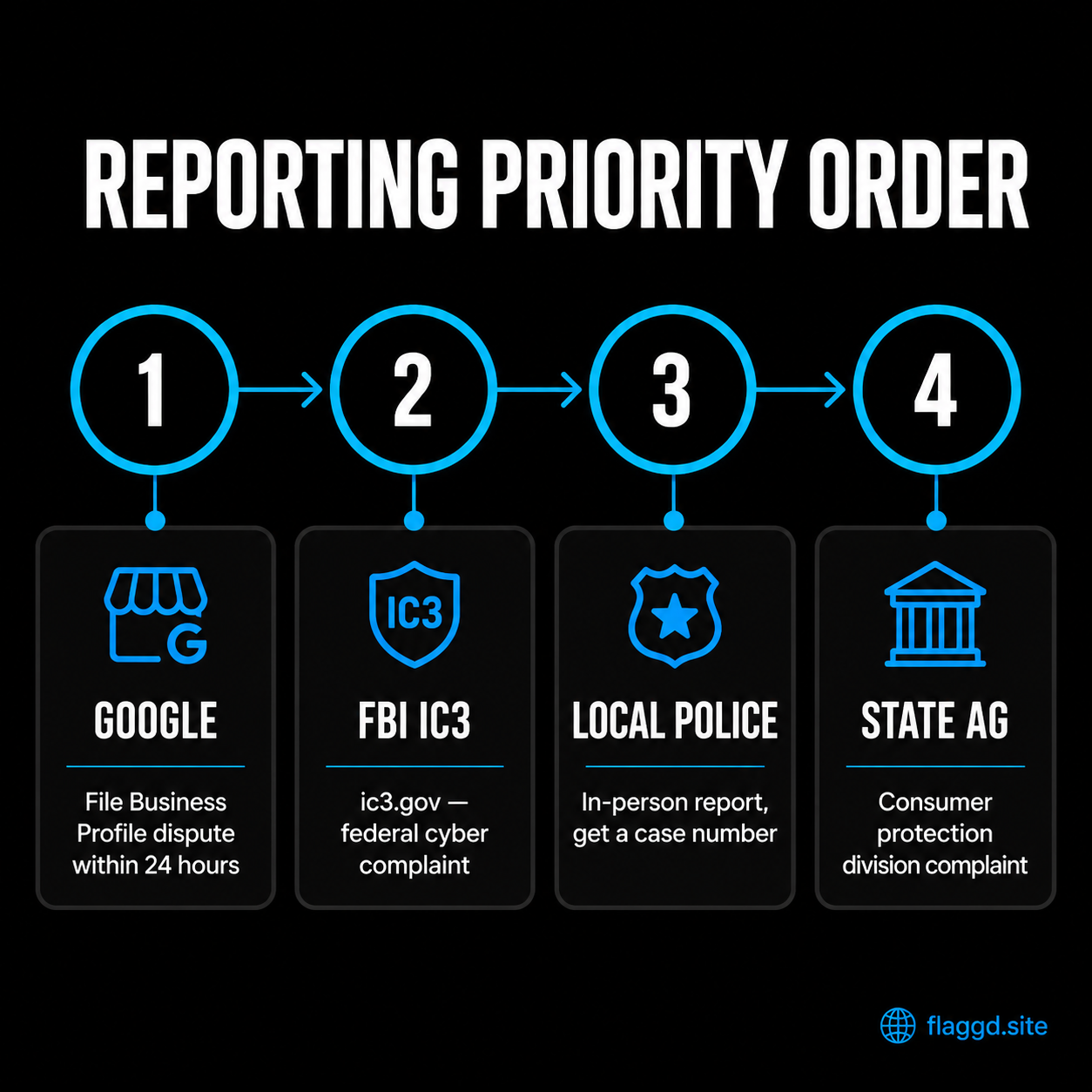
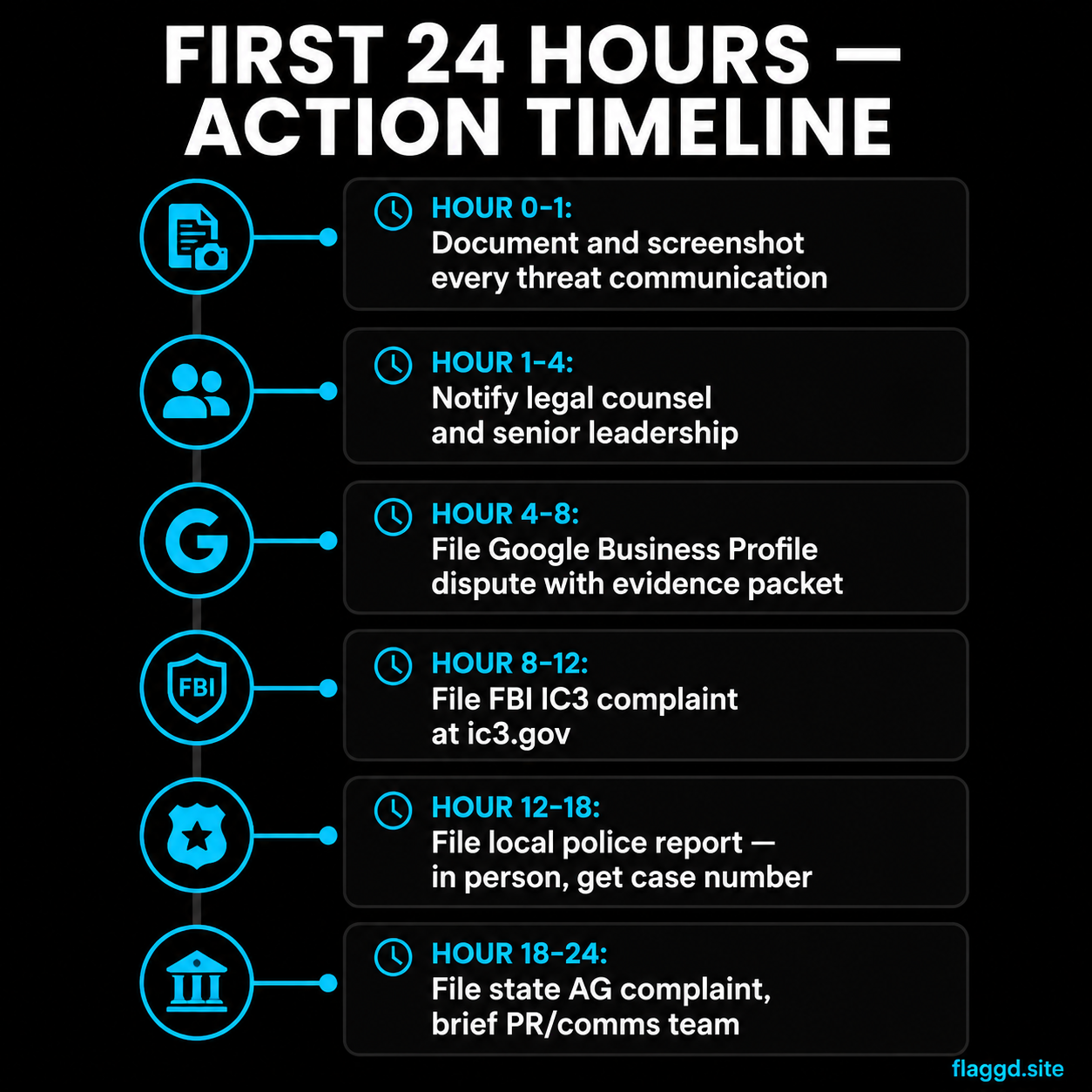
Why reporting order matters: Google first, then FBI, then police
The order in which you report review extortion matters, though you can file all reports simultaneously once you have assembled your evidence. Understanding the priority helps you allocate your effort and maximize the impact of each report.
Google first — immediate platform action. Google can remove the extortionate review within 24-72 hours if it violates their content policy. Extortion and coordinated inauthentic behavior are clear violations. Reporting through your Business Profile and the Trust & Safety team simultaneously increases the chance of rapid removal. From a business continuity perspective, removing the threat from your profile is the first priority — it stops the damage immediately and removes the "evidence" the extortionist is using as leverage. Additionally, if you report the extortionate review to Google, you can document Google's removal or response in subsequent police and FBI reports, strengthening your case by showing that authorities (including Google) recognized it as extortion.
FBI next — federal record and interstate jurisdiction. Most review extortion is conducted across state lines or through digital channels that fall under federal jurisdiction. The FBI's Internet Crime Complaint Center (IC3) takes cyberextortion seriously. Filing an IC3 complaint serves two purposes: it creates a federal record that other law enforcement can access (state police investigating the same perpetrator might already have an IC3 complaint on file), and it signals to local law enforcement that the case has federal interest, which can increase their responsiveness. If the extortionist uses the internet, email, or platforms to send threats, federal Internet fraud statutes apply.
Local police — official incident record and state jurisdiction. A local police report is essential even if the extortionist is in another state or the incident is primarily digital. The police report establishes an official record of the crime under your state's extortion statute, which can form the basis for a civil action, a restraining order, or cooperation with other agencies investigating the same perpetrator. Local police can also examine IP logs, device information, and account creation patterns if your hosting provider or Google provides data about the extortionist's identity.
State attorney general — consumer protection and coordinated enforcement. Many state AGs maintain databases of extortion complaints. If the extortionist is running a scheme targeting multiple businesses, your report may trigger an AG investigation that results in prosecution and civil penalties. State AGs can issue subpoenas to platforms and payment processors — a power local police sometimes lack — making them particularly effective when the extortionist collected payment from multiple victims.
Reporting through Google Business Profile: step-by-step
Google's own reporting tool is the fastest path to removal. Here is the exact process.
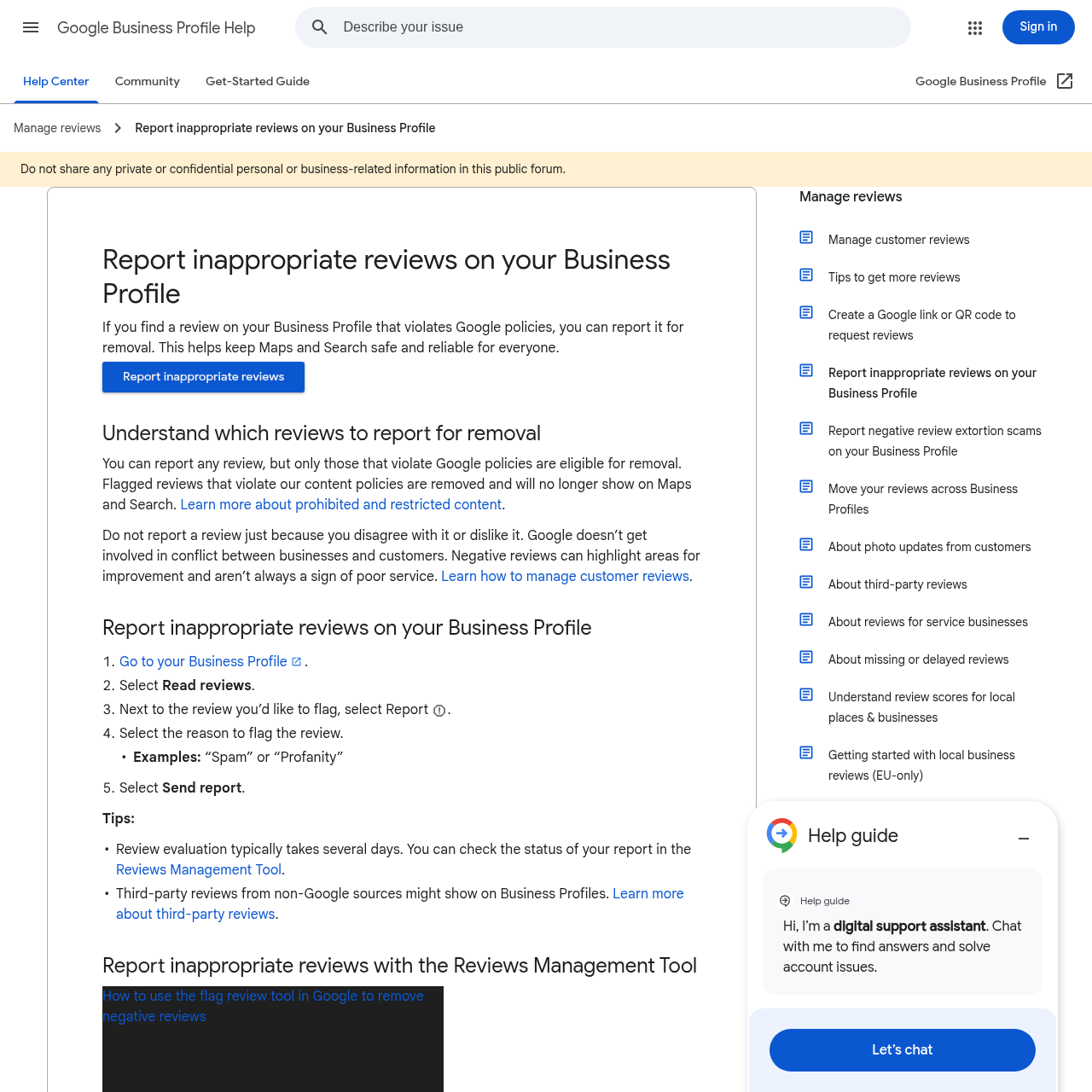
Step 1: Log into your Google Business Profile. Go to mybusiness.google.com or business.google.com (depending on your region and account setup). Verify you are signed in as the business owner or manager with appropriate permissions.
Step 2: Navigate to Reviews. On the left sidebar, click "Reviews." You will see a list of all reviews on your listing, filtered by rating or date. Locate the extortionate review. Do not remove or interact with it yet — you need to report it through Google's official flag process so there is a record of your report.
Step 3: Flag the review. Hover over the review. Three dots (⋯) will appear on the right. Click them, then select "Flag as inappropriate." A dialog box will open asking you to select a reason. Google's reasons include: "Sexual content," "Hate speech," "Illegal activity," "Spam or fake review," "Harassment or bullying," "Misleading or false information," "Personally identifiable information," and "Other." For extortion, select "Illegal activity" or "Harassment or bullying" (both are valid, though "Illegal activity" is more specific).
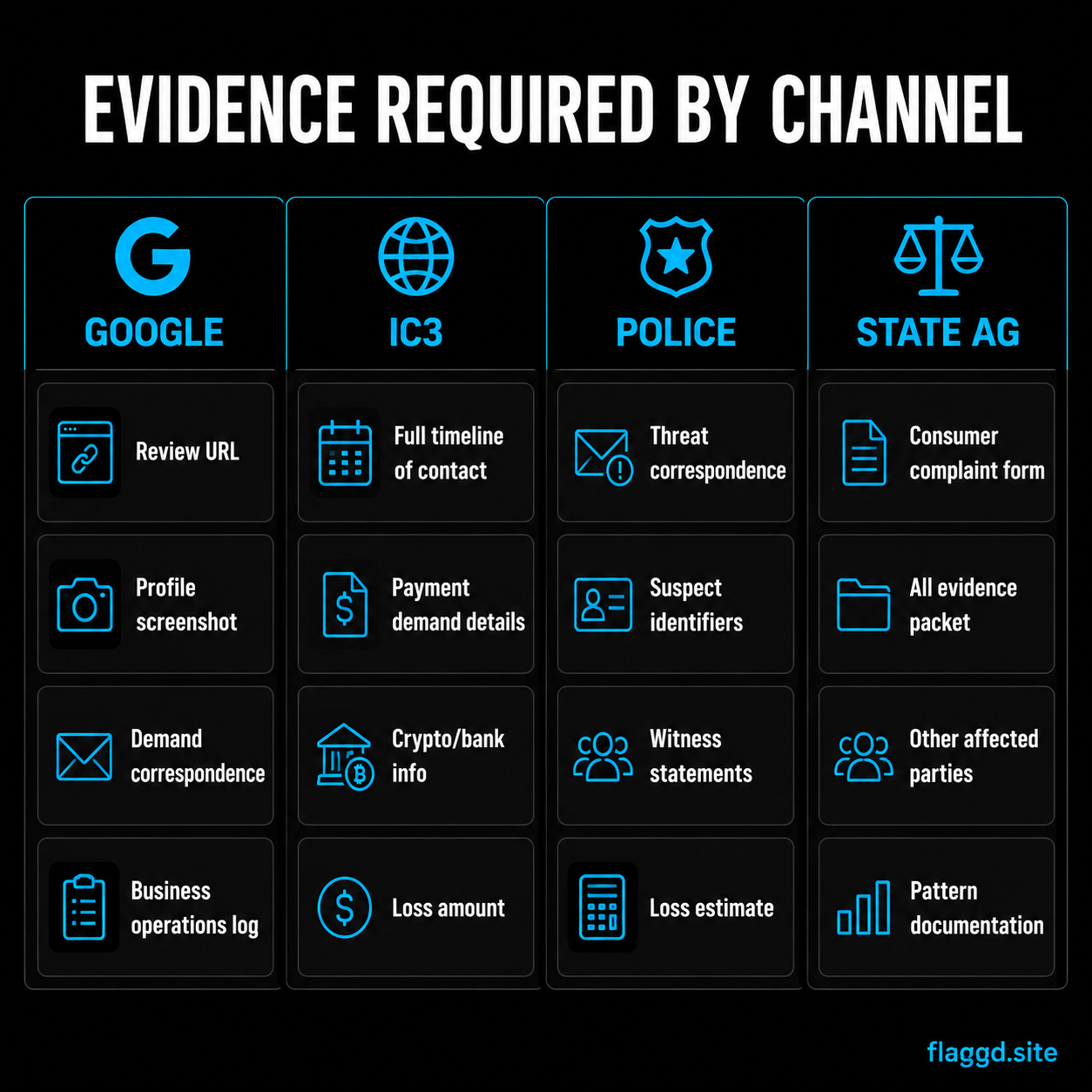
Step 4: Provide detailed context. In the text field that appears, write a detailed explanation of the extortion. Include: the specific demand being made ("They demanded $500 to remove the review"), the date and time of the demand, whether the demand came via the review text itself or through separate communication, and any proof of the extortion (screenshots of messages, email headers, etc.). Be specific — vague complaints like "this is unfair" are less likely to result in action than explicit descriptions of extortion.
Step 5: Submit with evidence attached if possible. If Google's form allows file uploads, attach screenshots or text evidence. If not, note in your description that you have evidence and mention you are also contacting Google's Trust & Safety team with detailed documentation. This signals that your report is serious and backed by evidence.
Step 6: Expect response in 3-7 days. Google typically reviews flagged content within this window. You will receive a notification in your Business Profile indicating whether the review was removed, kept, or remains under review. Screenshot this notification for your records — it is evidence that Google recognized the review as violating its policies.
Important: Do not respond to the extortionate review publicly. Engaging with the extortionist in the review comments can be interpreted as negotiation and may complicate your case with law enforcement. Let the review stand until Google removes it, or report it to police and the FBI while the evidence is still visible.
Contacting Google's Trust & Safety team directly
The Business Profile reporting tool is effective, but direct contact with Google's Trust & Safety team can accelerate removal and create a parallel record of the extortion.
Email: abuse@google.com — Google's primary trust and safety reporting address. Subject line: "Review Extortion — Immediate Removal Request [Your Business Name]." In the email body, include:
- Your business name and Google Business Profile URL
- The specific review URL (if you can construct it) or the reviewer's name and review date
- The exact text of the extortionate review
- A detailed description of the extortion: what was demanded, how the demand was communicated, and any evidence of threats
- Screenshots of all threatening messages, emails, or communications
- A timeline: when the extortionate review was posted, when the demand was made, and any follow-up communications
- Whether you have reported this to law enforcement (yes or no; if yes, mention the FBI IC3 complaint number if you have filed one)
- Your contact information: email, phone, and business mailing address
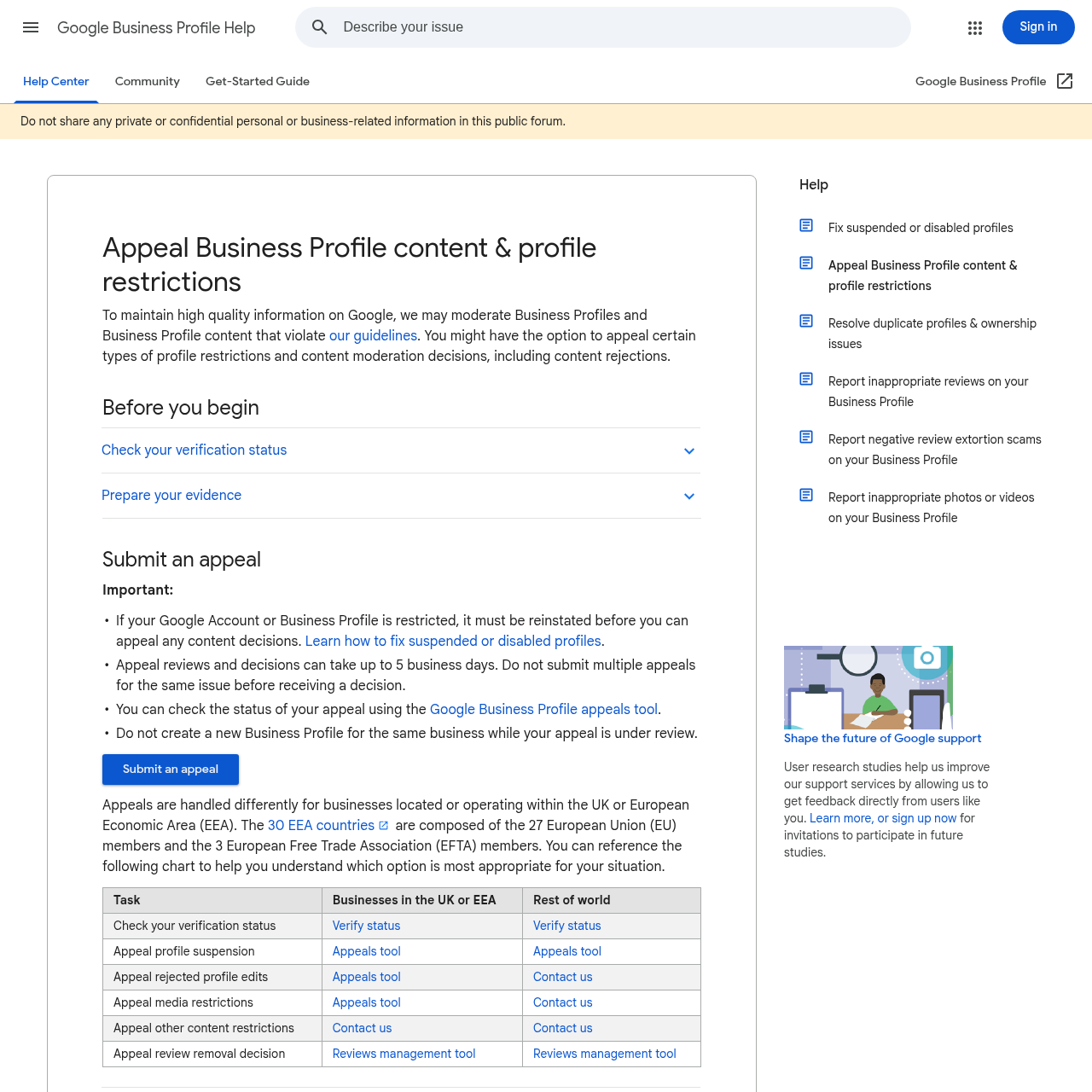
What Google investigates vs. what it may not. Google's Trust & Safety team focuses on policy violations visible on the platform: coordinated inauthentic behavior, spam, illegal content, and harassment. They can remove reviews that violate their content policy. However, Google generally does not investigate the perpetrator's identity or pursue criminal investigation — that is law enforcement's role. Google's job is to remove the review and prevent the account from reoffending. If you want the extortionist prosecuted, that requires FBI and local police involvement.
Do not demand payment or negotiation via email. If the extortionist has contacted you via email (separate from the review itself), forward those emails to abuse@google.com as evidence. Do not respond to the extortionist's demands — communicating back can complicate your law enforcement case by making it appear you entered into negotiation. Let law enforcement respond to the extortionist.
Filing an FBI Internet Crime Complaint (IC3)
The FBI's Internet Crime Complaint Center (ic3.gov) is a dedicated reporting portal for cybercrimes, including cyberextortion and review extortion.
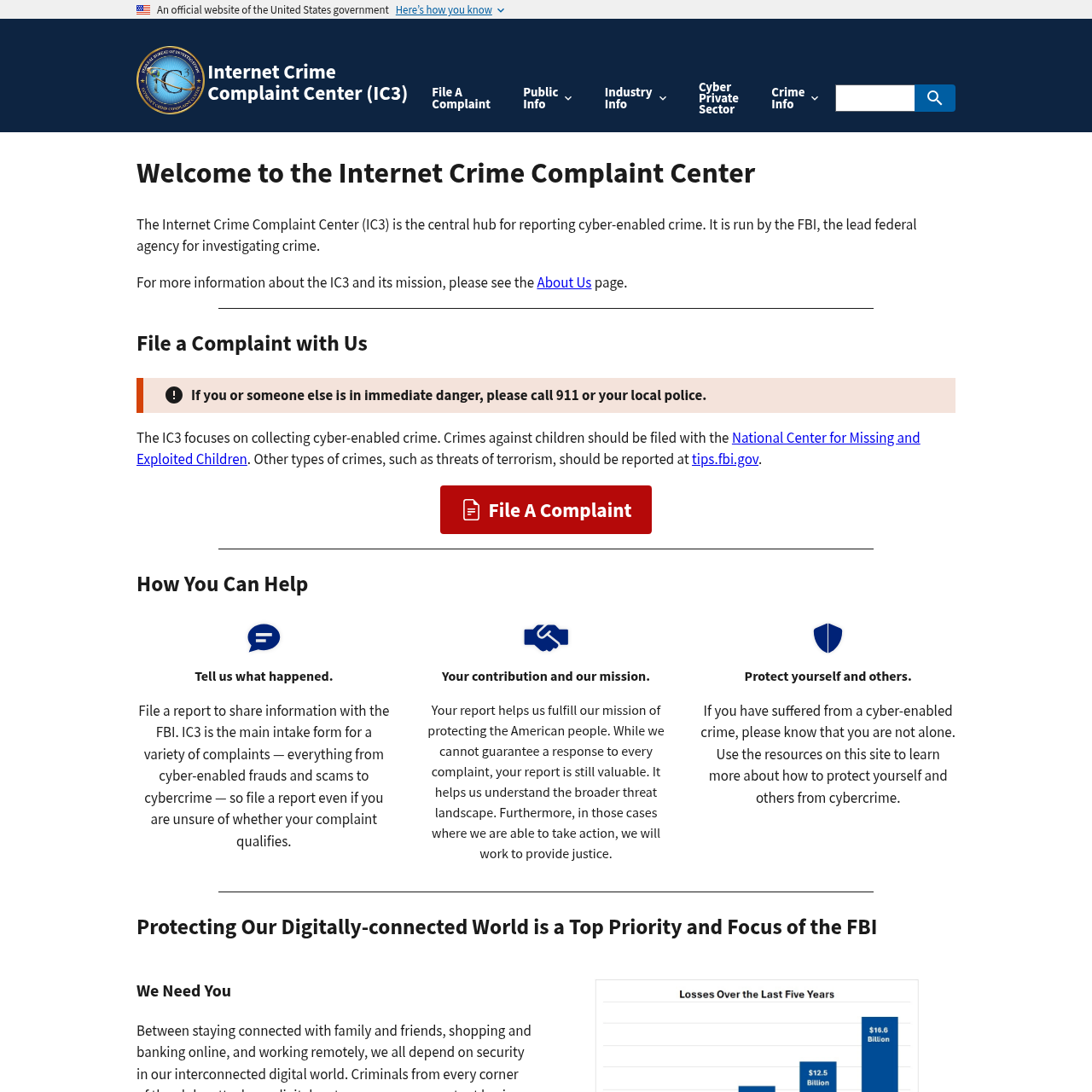
Step 1: Go to ic3.gov. Navigate to the site and click "File a Complaint." You will be prompted to create an IC3 account (or use an existing one if you have filed before).
Step 2: Select crime category. Choose "Extortion" from the list. The IC3 form will adapt to this category, asking specific questions about the nature of the extortion and the demands being made.
Step 3: Describe the incident in detail. The form asks for: (1) When did the extortion begin? (2) What is being threatened? (Answer: negative review posting, review damage, review removal) (3) What is being demanded? (Answer: money, refund, free services, other concession) (4) Has money been paid? (5) How was the demand communicated? (Email, review text, phone, social media, etc.) (6) Do you have identifying information about the perpetrator? (Name, email, phone, IP address, username, business address if known).
Step 4: Attach evidence. IC3 allows file uploads. Attach: screenshots of the review and any threatening messages, email headers or full email text showing extortion demands, a summary document listing all evidence with dates and times. If you have IP logs or device information from your Google Business Profile, include those. Include a one-page timeline of all events.
Step 5: Provide your information and submit. Complete your contact information, business details, and submit. You will receive a complaint number immediately. Screenshot or save this number — it is your reference for all future communication about this complaint.
FBI response timeline. The IC3 acknowledges receipt immediately with a complaint number. The FBI may contact you within days or weeks if they determine the complaint warrants investigation. Unlike local police, the FBI may not provide regular updates — federal investigations progress at the agency's pace. However, having an IC3 complaint on file signals seriousness and can influence local law enforcement's response. Many local police departments check the IC3 database when investigating cybercrimes.
Use the IC3 complaint number in other reports. When you file a police report or contact your state attorney general, reference your IC3 complaint number. This creates a chain of reports across agencies and helps coordinated response.
Filing a police report with your local department
A local police report is essential. It creates an official record under your state's extortion statute, allows you to pursue civil remedies (restraining orders, civil claims), and provides local law enforcement a basis to investigate and potentially prosecute.
Step 1: Contact your local police department. Call the non-emergency line or visit your local police precinct in person. If the extortionist has made threats of imminent harm, call 911. For financial extortion via reviews, use the non-emergency number. Ask to speak with an officer who handles cybercrimes, fraud, or extortion — many departments have specialized units.
Step 2: Prepare your evidence package. Before your report, assemble: printed screenshots of the extortionate review(s), printed copies of all threatening messages or emails, a written timeline with dates and times of all incidents, a summary document explaining the specific extortion (what was threatened, what was demanded), proof of any financial impact to your business (lost customers, reputation damage) if quantifiable, and your IC3 complaint number.
Step 3: File the report in person if possible. While online reporting is available in some jurisdictions, in-person reporting for extortion is preferable. It allows you to speak directly with an officer, clarify the details, and ensure the report is correctly documented. Bring all evidence in printed and digital form (USB drive or email attachments).
Step 4: Ensure the report specifically names the crime. When the officer asks about the nature of the incident, use the term "extortion." Many officers understand "extortion" immediately as a felony. Saying "someone left a bad review" or "I got threatening messages" may not trigger appropriate investigation protocols. Be explicit: "This is extortion — someone posted a negative review and demanded payment to remove it."
Step 5: Request a case number and follow-up contact. After filing the report, ask for: a police report case number, the officer's name and badge number, a timeframe for follow-up or investigation, and the best way to reach the investigator with new information. Write all of this down and keep it with your evidence file.
Follow-up with your local police. Police departments are often understaffed, and reports can get lost or deprioritized. Follow up with the investigating officer or unit every 2-4 weeks. If you do not hear back within 30 days, call the non-emergency line and ask for a status update on your case number. Persistent, professional follow-up increases the chance your case receives attention.
Reporting to your state attorney general
State attorneys general maintain consumer protection units that investigate fraud and extortion, particularly when multiple victims are involved. Review extortion schemes often target many businesses — reporting to the AG can trigger an investigation that reaches across state lines and identifies a pattern.
Step 1: Find your state attorney general's consumer protection division. Go to your state's official website (e.g., ag.ny.gov for New York) and search for "Consumer Protection" or "Fraud." Most state AGs have a dedicated online reporting portal or email address for consumer complaints.
Step 2: Determine the applicable extortion statute. Each state has extortion laws with slightly different language. Common statutes include: receiving property or money by threat of property damage, threat to reputation, or threat of action. Review extortion — threatening review damage to coerce payment — clearly fits the definition in all 50 states. You do not need to cite the specific statute; the AG's office will apply the appropriate law.
Step 3: File a complaint through the portal or email. Provide the same evidence you gave to police and the FBI: screenshots, timeline, threatening messages, your business information, the specific demands, and whether money was paid. Note whether other businesses may have been targeted by the same perpetrator — this increases the AG's interest in investigating, as it suggests an organized scheme.
Step 4: Mention pattern extortion if applicable. If you suspect the perpetrator has targeted other businesses with similar threats, or if you know of other businesses with comparable experiences, mention this explicitly. AGs pursue pattern crimes more aggressively because they signal organized, repeat criminal activity. Include any names or identifying information of other known victims if you are aware of them.
Step 5: Reference your police report and FBI IC3 complaint. Provide your police case number and IC3 complaint number. This creates a unified record across agencies and shows the extortion has been reported to multiple authorities, strengthening the case for AG investigation.
What state AGs can do that local police cannot. State attorneys general can issue subpoenas to Google, payment processors, email providers, and financial institutions — often faster and more effectively than local police. If the extortionist collected payment, the AG can subpoena payment records. If they used email or a platform account, the AG can force disclosure of identifying information. For systematic schemes, AGs can pursue civil forfeitures against accounts or assets used in the extortion.
Follow-up, case tracking, and escalation
After filing reports with Google, the FBI, local police, and your state AG, the process enters a monitoring and follow-up phase. Law enforcement investigations move slowly, and persistence matters.
Create a master case file. In a spreadsheet or document, record: the date you filed each report (Google, FBI IC3, police, AG), the case number for each, the name and contact information of the investigating officer or agency contact, the date of your last follow-up with each agency, and any new information you have learned. Update this file monthly as you follow up.
Follow up with local police every 2-4 weeks. Call the investigating officer or the police department's main line and ask for a status update on your case number. Ask: Has there been any progress? Do you need additional evidence? Are there leads on the perpetrator's identity? Document each follow-up in your master file, including the officer's name and what they told you. Regular follow-up increases the visibility and priority of your case.
Provide new evidence promptly. If you receive additional threatening messages, the extortionist posts new reviews, or you discover new identifying information (IP address, username, location), contact all investigating agencies immediately. Send the evidence to your local police officer, the FBI IC3 email (ic3@ic3.gov), your state AG, and Google. New evidence can accelerate investigation and strengthen a prosecution case.
Monitor for additional extortion attempts. If the extortionist remains active, new threats or reviews may appear. Continue documenting everything. The pattern of repeated extortion attempts strengthens law enforcement's case by showing the perpetrator is not a one-time actor but a systematic criminal.
Consider a civil restraining order in addition to criminal reports. While law enforcement investigates, you can pursue a civil restraining order (often called a "protective order" or "order of protection") through your local civil court. A restraining order prohibits the extortionist from contacting you, posting about your business, or threatening further reviews. Obtaining a civil order does not require proving the extortion "beyond a reasonable doubt" — the civil standard is "preponderance of the evidence," which is easier to meet. A civil restraining order can be obtained quickly (days or weeks) and provides immediate protection while criminal investigation proceeds.
Escalate if you do not see progress within 60 days. If your local police have not made progress on the case within two months, contact your state police agency or state attorney general's office and explain that you have filed a police report but received no follow-up. Ask if there is a way to escalate or whether the state police cyber unit can take the case. Some states have dedicated cyber crime units that investigate cases local departments cannot handle.
Coordinate with other victims if you identify them. If you learn that the same perpetrator has extorted other businesses, share information (without disclosing their private details). Coordinate your reports so that all victims file with the same agencies. Multiple complaints about the same perpetrator significantly increase the likelihood of investigation and prosecution. The FBI and state AGs specifically track pattern crimes and target offenders who abuse multiple victims.
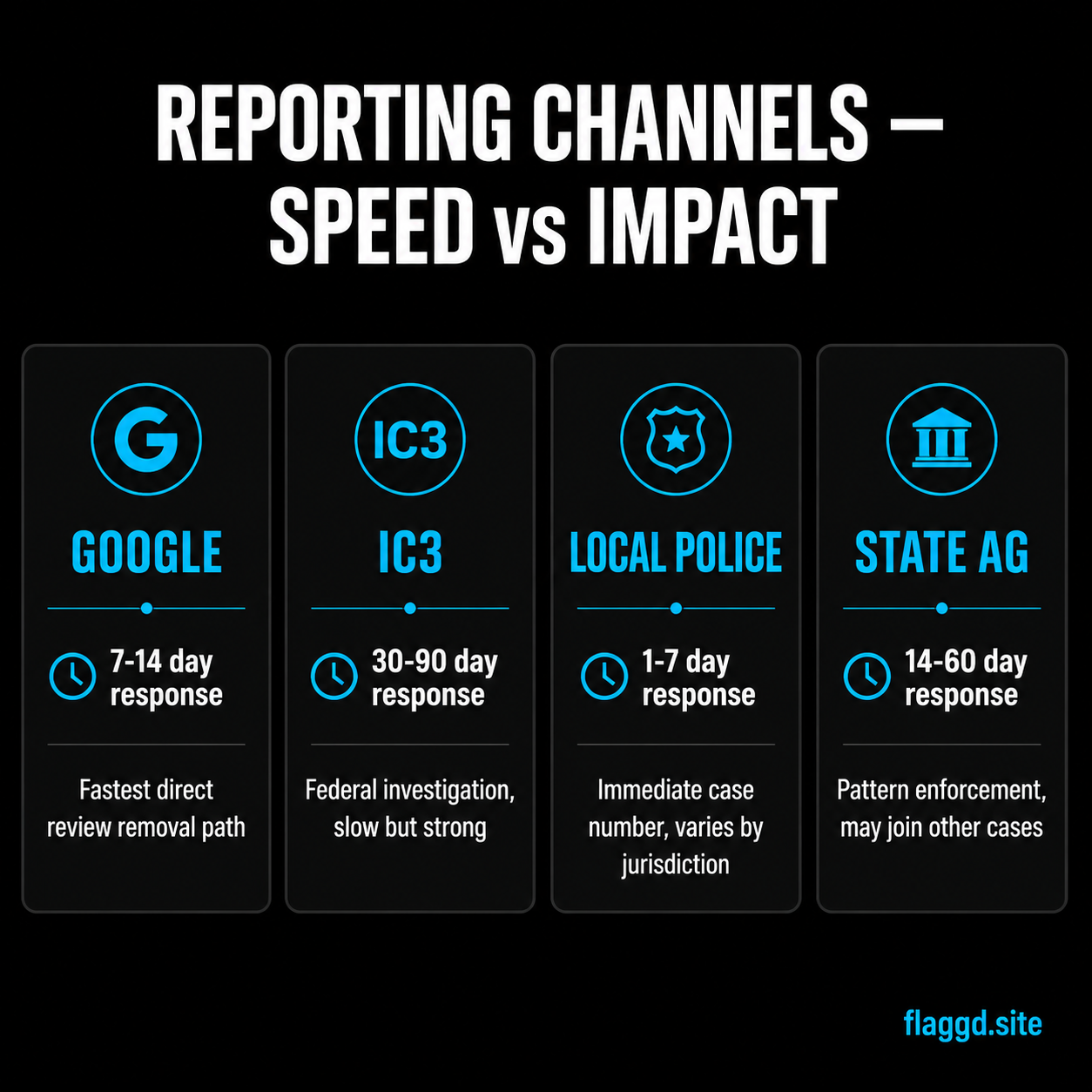
| Channel | What to Include | Response Time |
|---|---|---|
| Google Business Profile (Flag review) | Screenshot of review, specific policy violation category, detailed description of extortion | 3-7 days |
| Google Trust & Safety (abuse@google.com) | Review URL, threatening messages, timeline, business info, evidence of threats | 3-14 days |
| FBI IC3 (ic3.gov) | Detailed incident description, threats/demands, evidence files, perpetrator info if known, IC3 form completion | Immediate acknowledgment; investigation timeline varies |
| Local Police Department | Printed screenshots, threatening messages/emails, timeline, business impact, IC3 complaint number | Report filed immediately; investigation timeline 30-90+ days |
| State Attorney General | Screenshot evidence, threatening messages, timeline, police case number, IC3 complaint number, note if multiple victims | Complaint filed immediately; investigation decision 14-30 days |
- →Google review extortion: scam defense guide
- →Review extortion warning signs and legal protection
- →How to document evidence for a Google review dispute
- →How to contact Google Support about a review dispute
- →Can you sue for a fake Google review?
- →Google review defamation: when reviews cross the legal line
Frequently asked questions
Review extortion is not a gray area of law — it is a clear, prosecutable crime that law enforcement agencies across federal, state, and local levels take seriously when reported with evidence. The critical factor is documentation and persistence. The moment you receive an extortion threat, screenshot everything and report to all relevant authorities simultaneously. Do not engage with the extortionist, do not pay, and do not try to negotiate through the review comment section. The reporting chain you follow — Google first for immediate platform action, FBI for federal record, local police for state-level investigation, and state AG for coordinated enforcement — creates multiple pressure points on the perpetrator and increases the likelihood that the threat will be investigated and prosecuted. Law enforcement moves slowly, but the combination of platform removal, federal complaint, local police investigation, and state-level attention creates an environment where the extortionist's best outcome is to move on to an easier target. Your responsibility is to persist, keep detailed records, and follow up regularly until the case is resolved.